DMS Scanner
Ehlert.IT

DMS Scanner is the professional receipt scanner for field service, tradespeople, and small businesses that want to manage their own receipts. Receipts are scanned with the camera, saved locally as PDFs, and later transferred to your chosen destination at the touch of a button—optionally to a Windows server, a Synology or QNAP NAS, an FTPS server, a Nextcloud instance, or a Dropbox account.
No third-party cloud service involved. No third-party analysis of your receipts. No tracking. The app does not collect any data and transfers exclusively to your self-configured destination.
... FEATURES
• Camera scanner with automatic edge detection and manual corner correction
• Multi-page scans in a single pass
• PDF creation in DIN A4, fitted and borderless
• Add more pages to receipts or delete individual pages at any time
• Transfer to FTPS (implicit or explicit AUTH TLS, port 990/21)
• Transfer to SMB / SMB2 / SMB3 (Windows Server, Synology, QNAP, Samba)
• Transfer to Nextcloud via WebDAV (app password recommendation for enabled 2FA)
• Transfer to Dropbox via personal access token
• Folder browser on the server — select target folder directly from the live directory list
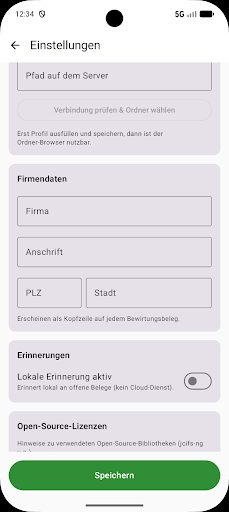
• Local reminders for open receipts (6 / 12 / 24 / 48 hours) via notification
• Business entertainment receipt function: additional PDF page with company header, entertainment details,
guests entertained, amounts, and Fingerprint signature — formatted correctly for tax purposes
• Server profile is retained when switching between protocols — users can switch back and forth without re-entering information
DATA PROTECTION
• Receipts are stored exclusively on the device (app-internal storage)
• Passwords and tokens are encrypted in the Android keystore (EncryptedSharedPreferences)
• Transfers take place directly between the device and the configured server
• No accounts, no registration, no cloud intermediary
• No advertising, no analytics
USE SCENARIOS
Field service: Employees scan fuel receipts, hotel bills, and entertainment expense receipts while on the go and transfer them to the company server in the evening.
Tradespeople: Delivery notes and material invoices are digitized directly on the construction site and automatically placed in the correct project folder on the company NAS.
Self-employed individuals: Business receipts are collected and, at the end of the month, taxed via entertainment expense receipts or transferred to their own document management system.
COMPATIBILITY
The app is compatible with common document management systems such as EcoDMS,
Paperless-ngx, DocuWare, and ELO. PDF files are generated in a format that is cleanly imported by all current DMS systems.
NETWORK DIAGNOSTIC
If the connection fails: integrated diagnostic tools check DNS resolution, TCP port reachability, and display a sanitized configuration snapshot—passwords are never revealed. This facilitates quick support.
OPEN SOURCE
The app uses open libraries such as jcifs-ng (SMB), OkHttp (Nextcloud + Dropbox),
and the AndroidX components. A complete license list with references to the source code of each library can be viewed in the app settings.
No third-party cloud service involved. No third-party analysis of your receipts. No tracking. The app does not collect any data and transfers exclusively to your self-configured destination.
... FEATURES
• Camera scanner with automatic edge detection and manual corner correction
• Multi-page scans in a single pass
• PDF creation in DIN A4, fitted and borderless
• Add more pages to receipts or delete individual pages at any time
• Transfer to FTPS (implicit or explicit AUTH TLS, port 990/21)
• Transfer to SMB / SMB2 / SMB3 (Windows Server, Synology, QNAP, Samba)
• Transfer to Nextcloud via WebDAV (app password recommendation for enabled 2FA)
• Transfer to Dropbox via personal access token
• Folder browser on the server — select target folder directly from the live directory list
• Local reminders for open receipts (6 / 12 / 24 / 48 hours) via notification
• Business entertainment receipt function: additional PDF page with company header, entertainment details,
guests entertained, amounts, and Fingerprint signature — formatted correctly for tax purposes
• Server profile is retained when switching between protocols — users can switch back and forth without re-entering information
DATA PROTECTION
• Receipts are stored exclusively on the device (app-internal storage)
• Passwords and tokens are encrypted in the Android keystore (EncryptedSharedPreferences)
• Transfers take place directly between the device and the configured server
• No accounts, no registration, no cloud intermediary
• No advertising, no analytics
USE SCENARIOS
Field service: Employees scan fuel receipts, hotel bills, and entertainment expense receipts while on the go and transfer them to the company server in the evening.
Tradespeople: Delivery notes and material invoices are digitized directly on the construction site and automatically placed in the correct project folder on the company NAS.
Self-employed individuals: Business receipts are collected and, at the end of the month, taxed via entertainment expense receipts or transferred to their own document management system.
COMPATIBILITY
The app is compatible with common document management systems such as EcoDMS,
Paperless-ngx, DocuWare, and ELO. PDF files are generated in a format that is cleanly imported by all current DMS systems.
NETWORK DIAGNOSTIC
If the connection fails: integrated diagnostic tools check DNS resolution, TCP port reachability, and display a sanitized configuration snapshot—passwords are never revealed. This facilitates quick support.
OPEN SOURCE
The app uses open libraries such as jcifs-ng (SMB), OkHttp (Nextcloud + Dropbox),
and the AndroidX components. A complete license list with references to the source code of each library can be viewed in the app settings.
Developer email
info@ehlert.it
Developer website
https://ehlert.itReleased
May 30, 2026
Current version
1.0.3
Android version
7.0
Screenshots