Foxbit Icon Pack
Edzon Diaz

4.5 stars224 reviews5,000+$0.99
PersonalizationEveryoneVersion 1.2.1Updated 3/25/2026, 2:11:13 PM
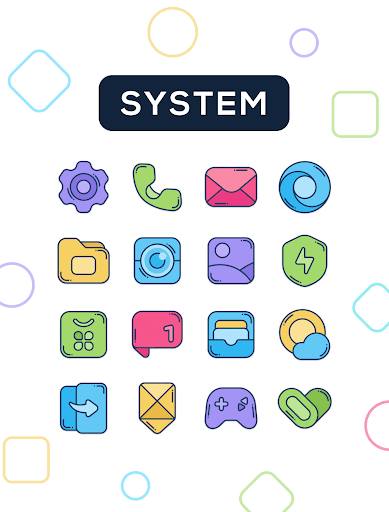
Open in StoreTired of the same old icons? Foxbit brings a fresh, colorful concept designed to illuminate your home screen with modern, clean, and vibrant icons.
Each icon has been carefully crafted with smooth lines and balanced colors
Features:
★ 2400+ Icons
★ 30 Wallpapers
★ Dynamic calendar icons
★ Support for many launchers
How to apply these icons?
1. Install a compatible launcher
2. Open Foxbit, go to the Apply section, and select your launcher
Compatible Launchers:
Smart Launcher, Nova Launcher, Lawnchair, Action Launcher, Apex Launcher, Flick Launcher, GO Launcher, Hyperion Launcher, Lucid Launcher, Microsoft Launcher, Mint Launcher, Niagara Launcher, Pie Launcher
(These launchers have been tested and are fully compatible, may also work with other unlisted launchers)
How to apply on Samsung phones?
1. Download Good Lock (Theme Park) from Galaxy Store
2. Open Theme Park and select Icon > Create New
3. Choose Foxbit Icon Pack, assign a name, and save
4. Select the pack and tap Apply
Contact
If you have questions or suggestions, contact me at edzon.dm@gmail.com
Each icon has been carefully crafted with smooth lines and balanced colors
Features:
★ 2400+ Icons
★ 30 Wallpapers
★ Dynamic calendar icons
★ Support for many launchers
How to apply these icons?
1. Install a compatible launcher
2. Open Foxbit, go to the Apply section, and select your launcher
Compatible Launchers:
Smart Launcher, Nova Launcher, Lawnchair, Action Launcher, Apex Launcher, Flick Launcher, GO Launcher, Hyperion Launcher, Lucid Launcher, Microsoft Launcher, Mint Launcher, Niagara Launcher, Pie Launcher
(These launchers have been tested and are fully compatible, may also work with other unlisted launchers)
How to apply on Samsung phones?
1. Download Good Lock (Theme Park) from Galaxy Store
2. Open Theme Park and select Icon > Create New
3. Choose Foxbit Icon Pack, assign a name, and save
4. Select the pack and tap Apply
Contact
If you have questions or suggestions, contact me at edzon.dm@gmail.com
Developer email
edzon.dm@gmail.com
Developer website
https://beacons.ai/edzon_dmReleased
Apr 9, 2020
Current version
1.2.1
Android version
5.0
Reviews & Ratings
4.5
out of 5
5
4
3
2
1
😊 Highly rated by users
224 reviewsScreenshots