우리동네 파크골프
evies

Our Neighborhood Park Golf is a park golf app designed for the 50-70 age group.
Try everything in one place, from finding nearby courses and recording scores to meeting neighbors to play with and managing clubs.
We designed it to be easy to use for everyone, from beginners to club presidents and treasurers.
■ Here's what you can do
• Find Courses
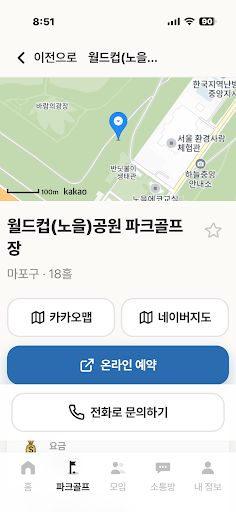
Search for park golf courses nationwide by region or number of holes, or browse them by proximity to your location. You can check registered rates, operating hours, days off, parking, and phone information at a glance.
• Reservations & Inquiries
For courses that support online reservations, we will connect you to the relevant reservation site. For courses requiring phone inquiries, simply use the phone button to contact them easily.
• Scorecard
Record your score for each hole using the +- buttons. You can also enter scores for your playing partners and share your game records via KakaoTalk. Check your own records through statistics and rankings.
• Neighborhood Gatherings
Meet neighbors to play with and easily arrange the time and location in the gathering chat room.
• Community Room
Share neighborhood news and stories about park golf with your neighbors.
• Schedule
Register your dates to visit the course and check them on the homepage.
• Learn Park Golf
Learn the rules and basics step-by-step with illustrations.
■ Manage Your Club Activities and Operations All in One Place
From members looking for a club to exercise with to management staff managing schedules and dues.
You can manage club membership, regular meetings, group formation, tournament proceedings, award results, and dues ledgers directly within the app.
• Find & Create Clubs
Search for a club by name to join, or create your own. You can join public clubs immediately, or apply for private clubs and receive approval to join. Management staff can set whether or not to recruit new members.
• Manage Members and Management
Check the member list and designate a treasurer to help run the club. The President and Secretary manage members according to their authority, and the President can approve membership applications for private clubs.
• Meeting Schedule and Attendance Confirmation
Register the date, time, and location for regular rounds or social gatherings. Members can indicate their attendance, and the management team can check the list of attendees to prepare for the event.
• Automatic Grouping and Manual Adjustment
Groups are automatically formed based on attendees, and you can finalize them after making manual adjustments if necessary. You can check who is playing in which group.
• Tournament Scores and Ongoing Rankings
Enter hole scores by group to check the progress and rankings of the game. Once the game ends, you can review the records and final results.
• Shin Perio and Various Award Methods
Supports a method that determines rankings based on total strokes and the Shin Perio method, which calculates handicaps using hidden hole scores. Depending on the tournament settings, you can check overall, men's, women's, and age-group rankings, and organize hole-in-ones and additional awards.
• Save & Share Award Results
Save and share competition results as a single image. You can also post results on the club bulletin board to view with members.
• Membership Fee Ledger and Payment Verification
Record membership fee income, expenses, and balances, and attach photos of receipts. Create monthly or event fee ledgers by round to check payment status for each member. The president can set whether the ledger is visible to members or only to the management team.
• Club Bulletin Board
Pin announcements and mandatory notices at the top and share posts, photos, and comments with members. You can share stories about the club, from meeting announcements to photos of the day and competition reviews.
■ Consideration for the 50-70 Generation
• Large fonts and easy-to-read buttons make it easy to find necessary functions.
• Adjust font size to suit your comfort level.
• Check hole scores with +/- buttons, and attend meetings with a simple selection.
■ Usage Fees
The app is free to use. Course usage fees vary by course. Please check the course's information, reservation website, or contact them by phone for details.
Club membership fees and event participation fees may be determined separately according to each club's operating standards.
Stay healthy, with your neighbors.
Try heading out to your local park golf course today.
Try everything in one place, from finding nearby courses and recording scores to meeting neighbors to play with and managing clubs.
We designed it to be easy to use for everyone, from beginners to club presidents and treasurers.
■ Here's what you can do
• Find Courses
Search for park golf courses nationwide by region or number of holes, or browse them by proximity to your location. You can check registered rates, operating hours, days off, parking, and phone information at a glance.
• Reservations & Inquiries
For courses that support online reservations, we will connect you to the relevant reservation site. For courses requiring phone inquiries, simply use the phone button to contact them easily.
• Scorecard
Record your score for each hole using the +- buttons. You can also enter scores for your playing partners and share your game records via KakaoTalk. Check your own records through statistics and rankings.
• Neighborhood Gatherings
Meet neighbors to play with and easily arrange the time and location in the gathering chat room.
• Community Room
Share neighborhood news and stories about park golf with your neighbors.
• Schedule
Register your dates to visit the course and check them on the homepage.
• Learn Park Golf
Learn the rules and basics step-by-step with illustrations.
■ Manage Your Club Activities and Operations All in One Place
From members looking for a club to exercise with to management staff managing schedules and dues.
You can manage club membership, regular meetings, group formation, tournament proceedings, award results, and dues ledgers directly within the app.
• Find & Create Clubs
Search for a club by name to join, or create your own. You can join public clubs immediately, or apply for private clubs and receive approval to join. Management staff can set whether or not to recruit new members.
• Manage Members and Management
Check the member list and designate a treasurer to help run the club. The President and Secretary manage members according to their authority, and the President can approve membership applications for private clubs.
• Meeting Schedule and Attendance Confirmation
Register the date, time, and location for regular rounds or social gatherings. Members can indicate their attendance, and the management team can check the list of attendees to prepare for the event.
• Automatic Grouping and Manual Adjustment
Groups are automatically formed based on attendees, and you can finalize them after making manual adjustments if necessary. You can check who is playing in which group.
• Tournament Scores and Ongoing Rankings
Enter hole scores by group to check the progress and rankings of the game. Once the game ends, you can review the records and final results.
• Shin Perio and Various Award Methods
Supports a method that determines rankings based on total strokes and the Shin Perio method, which calculates handicaps using hidden hole scores. Depending on the tournament settings, you can check overall, men's, women's, and age-group rankings, and organize hole-in-ones and additional awards.
• Save & Share Award Results
Save and share competition results as a single image. You can also post results on the club bulletin board to view with members.
• Membership Fee Ledger and Payment Verification
Record membership fee income, expenses, and balances, and attach photos of receipts. Create monthly or event fee ledgers by round to check payment status for each member. The president can set whether the ledger is visible to members or only to the management team.
• Club Bulletin Board
Pin announcements and mandatory notices at the top and share posts, photos, and comments with members. You can share stories about the club, from meeting announcements to photos of the day and competition reviews.
■ Consideration for the 50-70 Generation
• Large fonts and easy-to-read buttons make it easy to find necessary functions.
• Adjust font size to suit your comfort level.
• Check hole scores with +/- buttons, and attend meetings with a simple selection.
■ Usage Fees
The app is free to use. Course usage fees vary by course. Please check the course's information, reservation website, or contact them by phone for details.
Club membership fees and event participation fees may be determined separately according to each club's operating standards.
Stay healthy, with your neighbors.
Try heading out to your local park golf course today.
Developer email
incomline9@gmail.com
Developer website
https://dongnepg.comCurrent version
1.0.0.2
Android version
6.0
Screenshots