PDF Scanner - Document Scanner
Maxlabs Office Tools

4.5 stars64,610 reviews10,000,000+Free
ProductivityEveryoneVersion 3.3.3Updated 4/21/2026, 9:55:41 AM
Open in Store- We ensure that we never collect personal data.
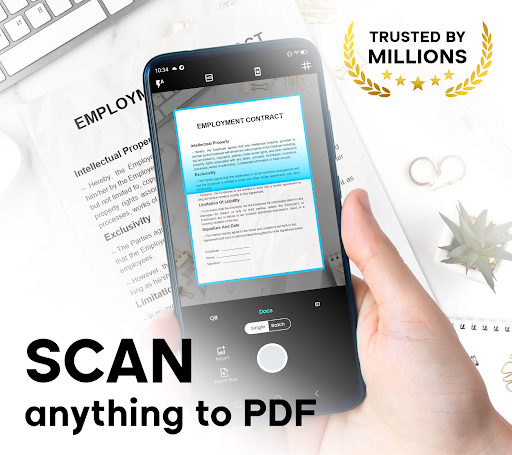
- PDF Scanner - Document Scanner is a portable mobile scanner app that allows you to scan everything as high-quality images (JPEG) or PDF file formats.
- This document scanner uses your smartphone camera to scan multi-page documents, ID cards, whiteboards, receipts, notes, and other text. With this camera scanner, you can quickly scan your documents and share them via Email, Bluetooth, or cloud storage like Google Drive.
- This pro scanner app offers easier and faster scanning with a simple interface, greater functionality, and fewer limitations for all your scan to pdf needs.
[Main features]
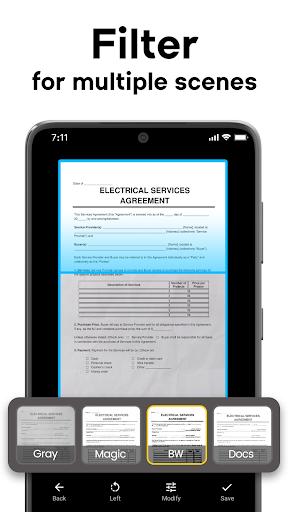
⭐ High-quality document scanner: Scan in color, grayscale, or black & white.
⭐ Smart document management: Easily manage and organize your files.
⭐ Versatile paper sizes: Supports Letter, Legal, A4, A3, A2, Business Card, and more.
⭐ PDF Maker tools: Multiple levels of contrast for crisp monochrome texts and multi-page scanning.
⭐ Smart detection: Automatic document edge detection and perspective correction for a perfect scan.
⭐ Ultra-fast processing: Enjoy quick searching and rapid image to pdf conversion.
⭐ Professional output: Reliable PDF scanner with high-quality PNG and PDF output.
⭐ Easy sharing: Share docs in PDF or JPEG format via social media, email, and more.
[Permission Overview]
Storage: PDF Scanner - Document Scanner to PDF needs permission to manage document files on your phone.
Camera: Our scanner app needs permission to use the camera to scan documents accurately.
From Android 11: This pdf scanner app needs to grant ""All files Access"" permission (MANAGE_EXTERNAL_STORAGE) to manage all document files in shared storage. We ensure that we never collect any personal data of users.
[Disclaimers]
All copyrights reserved to their respective owners.
If you notice that any content in our app violates copyrights, please inform us so that we can remove that content immediately.
Privacy Policy: https://www.maxlabs.hk/privacy-policy
Contact: android-support@maxlabs.hk
- PDF Scanner - Document Scanner is a portable mobile scanner app that allows you to scan everything as high-quality images (JPEG) or PDF file formats.
- This document scanner uses your smartphone camera to scan multi-page documents, ID cards, whiteboards, receipts, notes, and other text. With this camera scanner, you can quickly scan your documents and share them via Email, Bluetooth, or cloud storage like Google Drive.
- This pro scanner app offers easier and faster scanning with a simple interface, greater functionality, and fewer limitations for all your scan to pdf needs.
[Main features]
⭐ High-quality document scanner: Scan in color, grayscale, or black & white.
⭐ Smart document management: Easily manage and organize your files.
⭐ Versatile paper sizes: Supports Letter, Legal, A4, A3, A2, Business Card, and more.
⭐ PDF Maker tools: Multiple levels of contrast for crisp monochrome texts and multi-page scanning.
⭐ Smart detection: Automatic document edge detection and perspective correction for a perfect scan.
⭐ Ultra-fast processing: Enjoy quick searching and rapid image to pdf conversion.
⭐ Professional output: Reliable PDF scanner with high-quality PNG and PDF output.
⭐ Easy sharing: Share docs in PDF or JPEG format via social media, email, and more.
[Permission Overview]
Storage: PDF Scanner - Document Scanner to PDF needs permission to manage document files on your phone.
Camera: Our scanner app needs permission to use the camera to scan documents accurately.
From Android 11: This pdf scanner app needs to grant ""All files Access"" permission (MANAGE_EXTERNAL_STORAGE) to manage all document files in shared storage. We ensure that we never collect any personal data of users.
[Disclaimers]
All copyrights reserved to their respective owners.
If you notice that any content in our app violates copyrights, please inform us so that we can remove that content immediately.
Privacy Policy: https://www.maxlabs.hk/privacy-policy
Contact: android-support@maxlabs.hk
Developer email
android-support@maxlabs.hk
Developer website
https://www.maxlabs.hk/Released
Oct 5, 2020
Current version
3.3.3
Android version
6.0
Reviews & Ratings
4.5
out of 5
5
4
3
2
1
😊 Highly rated by users
64,610 reviewsScreenshots