EBSi 고교강의
EBS(한국교육방송공사)

3.2 stars22,234 reviews5,000,000+Free
EducationEveryoneVersion 4.6.8Updated 1/22/2026, 7:31:17 AM
Open in StorePersonalized learning just for you!
Experience a learning environment optimized for you with the EBSi High School Lecture App!
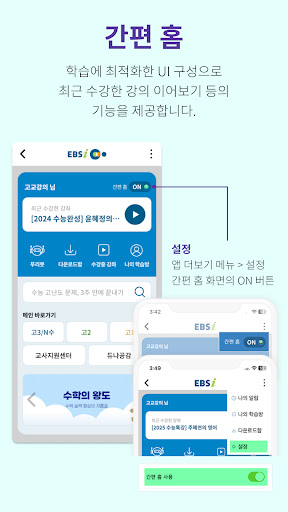
1. Simple Home Function
- UI optimized for learning
- Added ability to resume recently taken lectures
- Provides shortcuts to frequently used functions
2. More convenient video learning and learning window (player)
- 0.6 to 2.0x playback speed (adjustable in 0.1 increments) and playback controls
- Resume next lecture
- Section repeat, bookmark, and course registration functions
- Subtitle display and size settings (for courses with subtitles)
3. EBSi's personalized course recommendations
- The secret to EBSi users' improved grades
- Recommended courses tailored to your grade, level, and subject area, including AI-recommended courses, weekly popular courses, and upcoming courses
- Customized curriculum at a glance: Simply enter your grade, subject area/subject, learning level, and learning concerns to view EBSi's course curriculum tailored to your specific area at a glance.
4. From checking your learning progress to course registration! My Study Room
- Check your learning progress at any time.
- My Courses: Sort your current and completed courses by subject, date, and most recent learning.
- Cancel and retake courses.
- Motivate yourself with course completion badges and achievement stamps.
5. Convenient Download Box, No Network Concerns
- Simply download and play files without a network connection (Download Box only).
- Play, delete, sort, and edit downloaded EBSi high school lectures and English MP3s.
6. Detailed and Easy Search
- Displays recent and recommended search terms.
- Search courses by keyword, category, and textbook.
- Search filters and search history display.
7. View EBSi's specialized courses and series.
- Browse courses and series by latest, most popular, or area.
- View course-related information at a glance (course reviews, resource center, learning Q&A, textbook information, etc.).
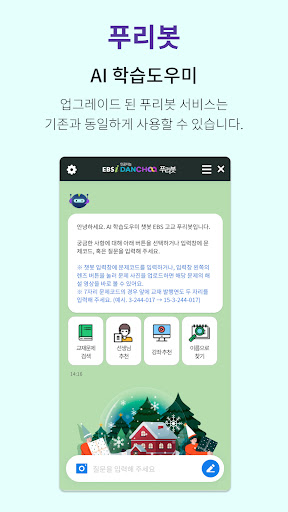
8. DANCHOO, an AI button powered by EBSi's big data. - From explanations of unfamiliar questions to recommendations for the right questions!
- Problem Search: Enter a picture of a problem or question code, and a chatbot service will display the solution (video or answer sheet) for that problem.
- Course Recommendation: Recommended courses to address your weaknesses.
- Test Creation: Create your own test by collecting only the areas you need from textbooks and past exam questions.
- Problem Recommendation: Recommends questions appropriate to your level, allowing you to focus on your weaknesses.
- AI Learning Index: Provides information on your learning progress by subject area.
- If you don't know the question code, use the textbook question-by-question lecture search service: Select a textbook and search for explanation lectures.
9. My Learning Mate, EBSi Teachers
- View teachers by grade and subject area.
- Teacher videos, news, course and textbook information at a glance.
10. My Notifications: Full of learning-related information.
- Course-related notifications, consultations/inquiries/event winner notifications, course/textbook/teacher/event openings, and admission information (full service). EBSi's new services, benefits, and advertising information can be provided.
[App Access Permissions Guide]
* Required Permissions
Android 12 and below
- Storage : This permission is required to download lecture videos and lecture materials, search for EBS button Puribot commentary lectures, post questions in Learning Q&A, and attach saved images when writing posts.
Android 13 or higher
- Notifications: This permission is required to receive device notifications for information such as learning Q&A answers and series opening announcements.
- Media (music and audio, photos and videos): This permission is required to play and download lectures, search for Puribot commentary lectures, post questions in Learning Q&A, and attach images when writing posts.
* Optional Access Permissions
- Camera: This permission is required to search for EBS button Puribot commentary lectures, post questions in Learning Q&A, and attach photos when writing posts.
※ "Optional Access Permissions" require permission to use the corresponding feature. Services other than the corresponding feature can still be used even if permission is not granted.
※ This feature is available on Android 6.0 or higher.
[App Usage Guide]
- [Minimum Requirements] Android 6.0 or higher
※ Minimum requirements for high-quality lectures (1MB) at 2x speed: Android 5.0 or higher, CPU: Snapdragon/Exynos
[Inquiries and Error Reporting]
- Phone inquiries: EBS Customer Center 1588-1580
- Email inquiries: helpdesk@ebs.co.kr
Experience a learning environment optimized for you with the EBSi High School Lecture App!
1. Simple Home Function
- UI optimized for learning
- Added ability to resume recently taken lectures
- Provides shortcuts to frequently used functions
2. More convenient video learning and learning window (player)
- 0.6 to 2.0x playback speed (adjustable in 0.1 increments) and playback controls
- Resume next lecture
- Section repeat, bookmark, and course registration functions
- Subtitle display and size settings (for courses with subtitles)
3. EBSi's personalized course recommendations
- The secret to EBSi users' improved grades
- Recommended courses tailored to your grade, level, and subject area, including AI-recommended courses, weekly popular courses, and upcoming courses
- Customized curriculum at a glance: Simply enter your grade, subject area/subject, learning level, and learning concerns to view EBSi's course curriculum tailored to your specific area at a glance.
4. From checking your learning progress to course registration! My Study Room
- Check your learning progress at any time.
- My Courses: Sort your current and completed courses by subject, date, and most recent learning.
- Cancel and retake courses.
- Motivate yourself with course completion badges and achievement stamps.
5. Convenient Download Box, No Network Concerns
- Simply download and play files without a network connection (Download Box only).
- Play, delete, sort, and edit downloaded EBSi high school lectures and English MP3s.
6. Detailed and Easy Search
- Displays recent and recommended search terms.
- Search courses by keyword, category, and textbook.
- Search filters and search history display.
7. View EBSi's specialized courses and series.
- Browse courses and series by latest, most popular, or area.
- View course-related information at a glance (course reviews, resource center, learning Q&A, textbook information, etc.).
8. DANCHOO, an AI button powered by EBSi's big data. - From explanations of unfamiliar questions to recommendations for the right questions!
- Problem Search: Enter a picture of a problem or question code, and a chatbot service will display the solution (video or answer sheet) for that problem.
- Course Recommendation: Recommended courses to address your weaknesses.
- Test Creation: Create your own test by collecting only the areas you need from textbooks and past exam questions.
- Problem Recommendation: Recommends questions appropriate to your level, allowing you to focus on your weaknesses.
- AI Learning Index: Provides information on your learning progress by subject area.
- If you don't know the question code, use the textbook question-by-question lecture search service: Select a textbook and search for explanation lectures.
9. My Learning Mate, EBSi Teachers
- View teachers by grade and subject area.
- Teacher videos, news, course and textbook information at a glance.
10. My Notifications: Full of learning-related information.
- Course-related notifications, consultations/inquiries/event winner notifications, course/textbook/teacher/event openings, and admission information (full service). EBSi's new services, benefits, and advertising information can be provided.
[App Access Permissions Guide]
* Required Permissions
Android 12 and below
- Storage : This permission is required to download lecture videos and lecture materials, search for EBS button Puribot commentary lectures, post questions in Learning Q&A, and attach saved images when writing posts.
Android 13 or higher
- Notifications: This permission is required to receive device notifications for information such as learning Q&A answers and series opening announcements.
- Media (music and audio, photos and videos): This permission is required to play and download lectures, search for Puribot commentary lectures, post questions in Learning Q&A, and attach images when writing posts.
* Optional Access Permissions
- Camera: This permission is required to search for EBS button Puribot commentary lectures, post questions in Learning Q&A, and attach photos when writing posts.
※ "Optional Access Permissions" require permission to use the corresponding feature. Services other than the corresponding feature can still be used even if permission is not granted.
※ This feature is available on Android 6.0 or higher.
[App Usage Guide]
- [Minimum Requirements] Android 6.0 or higher
※ Minimum requirements for high-quality lectures (1MB) at 2x speed: Android 5.0 or higher, CPU: Snapdragon/Exynos
[Inquiries and Error Reporting]
- Phone inquiries: EBS Customer Center 1588-1580
- Email inquiries: helpdesk@ebs.co.kr
Developer email
helpdesk@ebs.co.kr
Developer website
http://m.ebsi.co.krReleased
Jul 4, 2013
Current version
4.6.8
Android version
6.0
Reviews & Ratings
3.2
out of 5
5
4
3
2
1
😕 Lower user ratings overall
22,234 reviewsScreenshots