Cash Control
Cash-Control

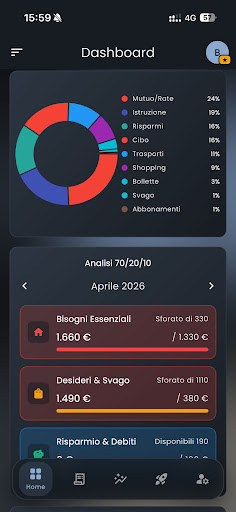
Cash Control is a simple and intuitive app designed to help you keep your personal finances under control.
Record expenses, track income, and organize your budget in a clear and structured way. Cash Control is designed for users who want to better understand their spending habits and manage their money more consciously.
🔹 Key Features
• Manual entry of expenses and income
• Transaction organization by categories
• Monthly and yearly summaries
• Budget and personal project management
• Clean and intuitive interface
• Secure access via email or Google account
• Cloud data synchronization
All financial data is entered manually by the user and used exclusively for personal tracking purposes.
🔐 Free Trial and Subscription
New users get full access to all features for the first month free.
After the trial period:
• The app remains usable in read-only mode
• All data and statistics can still be viewed
• An active subscription is required to add or edit information
Subscriptions are securely managed through Google Play.
🔒 Privacy and Security
Protecting your privacy is a top priority.
• Secure authentication
• Data encrypted in transit
• No ads
• No selling of personal data
• Account and data can be deleted at any time directly from the app
Cash Control uses cloud services exclusively to provide essential features such as authentication, data storage, and usage analytics.
⚠️ Disclaimer
Cash Control is a personal finance tracking tool.
It does not provide financial advice, investment services, payments, or banking features.
Take control of your finances, stay organized, and always keep track of your spending with Cash Control.
Record expenses, track income, and organize your budget in a clear and structured way. Cash Control is designed for users who want to better understand their spending habits and manage their money more consciously.
🔹 Key Features
• Manual entry of expenses and income
• Transaction organization by categories
• Monthly and yearly summaries
• Budget and personal project management
• Clean and intuitive interface
• Secure access via email or Google account
• Cloud data synchronization
All financial data is entered manually by the user and used exclusively for personal tracking purposes.
🔐 Free Trial and Subscription
New users get full access to all features for the first month free.
After the trial period:
• The app remains usable in read-only mode
• All data and statistics can still be viewed
• An active subscription is required to add or edit information
Subscriptions are securely managed through Google Play.
🔒 Privacy and Security
Protecting your privacy is a top priority.
• Secure authentication
• Data encrypted in transit
• No ads
• No selling of personal data
• Account and data can be deleted at any time directly from the app
Cash Control uses cloud services exclusively to provide essential features such as authentication, data storage, and usage analytics.
⚠️ Disclaimer
Cash Control is a personal finance tracking tool.
It does not provide financial advice, investment services, payments, or banking features.
Take control of your finances, stay organized, and always keep track of your spending with Cash Control.
Developer email
info@cashcontrol.website
Developer website
https://cashcontrol.website/Released
Apr 23, 2026
Current version
1.9.0
Android version
7.0
Screenshots