Car Cast - Screen Mirror
Toxic Degu Ltd

1.8 stars61 reviews10,000+Free
Auto & VehiclesEveryoneVersion 2026.10.5Updated 10/5/2026, 10:43:27 AM
Open in StoreCast your Android phone screen to your Tesla's main display. Stream video, take video calls, and navigate with Waze. Car Cast is your Tesla screen mirror.
Car Cast turns your Tesla into a smart extension of your Android phone. Whether you're parked watching a movie, taking a video call from the driveway, or driving with your favourite navigation app, screen mirror your phone to Tesla in a couple of taps.
▶ KEY FEATURES
- Mirror Android to Tesla — your phone screen, on your Tesla's display
- Watch your own movies — stream films, YouTube, sport, and live TV by mirroring your phone to Tesla
- Big-screen video calls — share Zoom, Microsoft Teams, or Google Meet on the Tesla display
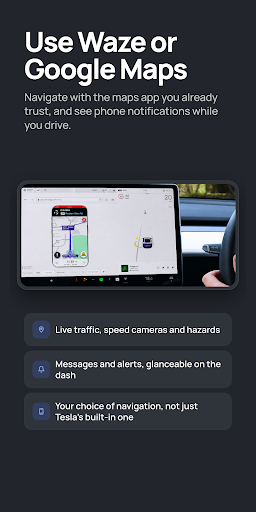
- Choose your sat nav — use Waze, Google Maps, or any navigation app you prefer
- Easy, one-time setup — pair your Tesla and phone once, then cast in seconds every time
- No technical jargon — no VPNs, no proxies, no typing out IP addresses
- No hotspot required — use Tesla Premium Connectivity or your home WiFi
- Free plan — try Car Cast with no subscription required
- Premium video quality — choose from 240p up to 1080p Full HD
- Smooth playback — frame rate up to 60 FPS for Premium users
▶ COMPATIBLE TESLA MODELS
✅ Tesla Model S
✅ Tesla Model 3
✅ Tesla Model X
✅ Tesla Model Y
Your Tesla must have MCU2 or newer to use screen mirror in Park mode — typically Tesla vehicles built after March 2018. Drive mode requires the Tesla browser to be available while driving. Other vehicles with a modern Chromium-based in-car browser may also work.
▶ TESLA DOESN'T HAVE ANDROID AUTO. CAR CAST DOES THE JOB.
Tesla vehicles don't support Android Auto or Apple CarPlay. Car Cast is the practical Android alternative — a Tesla screen mirror that puts the apps you already use onto your Tesla's main display. Run Waze with live traffic. Stream Spotify, YouTube Music, or your podcast app. Take a Teams call from the driveway. Cast a movie to your Tesla while you wait at a Supercharger.
▶ HOW IT WORKS
Car Cast screencasts your Android phone in real time over WiFi, your Tesla's Premium Connectivity, or your phone's 4G/5G connection. Open Car Cast, follow the on-screen steps once, and you're casting to Tesla in under two minutes.
▶ WHAT WORKS, AND WHAT DOESN'T
Most apps mirror normally — YouTube, Twitch, web video, video calls, browsers, navigation, and music apps.
Some apps with copyright-protected content (Netflix, Disney+, Amazon Prime Video, Apple TV) display a black screen when mirrored. This is a restriction enforced by those streaming services, not a fault of Car Cast.
▶ PRICING
- Free plan: 20 minutes of streaming per month. No subscription needed.
- Premium: monthly, annual, or lifetime one-time purchase. Unlocks unlimited streaming, 1080p Full HD output, and 60 FPS playback.
Subscriptions auto-renew unless cancelled at least 24 hours before the period ends. Manage or cancel any time in your Google Play account.
Terms of Use: https://carcastapp.com/terms.html
Privacy Policy: https://carcastapp.com/privacy.html
Car Cast is not affiliated with, endorsed by, or sponsored by Tesla, Inc. Tesla, Model S, Model 3, Model X, and Model Y are trademarks of Tesla, Inc.
Car Cast turns your Tesla into a smart extension of your Android phone. Whether you're parked watching a movie, taking a video call from the driveway, or driving with your favourite navigation app, screen mirror your phone to Tesla in a couple of taps.
▶ KEY FEATURES
- Mirror Android to Tesla — your phone screen, on your Tesla's display
- Watch your own movies — stream films, YouTube, sport, and live TV by mirroring your phone to Tesla
- Big-screen video calls — share Zoom, Microsoft Teams, or Google Meet on the Tesla display
- Choose your sat nav — use Waze, Google Maps, or any navigation app you prefer
- Easy, one-time setup — pair your Tesla and phone once, then cast in seconds every time
- No technical jargon — no VPNs, no proxies, no typing out IP addresses
- No hotspot required — use Tesla Premium Connectivity or your home WiFi
- Free plan — try Car Cast with no subscription required
- Premium video quality — choose from 240p up to 1080p Full HD
- Smooth playback — frame rate up to 60 FPS for Premium users
▶ COMPATIBLE TESLA MODELS
✅ Tesla Model S
✅ Tesla Model 3
✅ Tesla Model X
✅ Tesla Model Y
Your Tesla must have MCU2 or newer to use screen mirror in Park mode — typically Tesla vehicles built after March 2018. Drive mode requires the Tesla browser to be available while driving. Other vehicles with a modern Chromium-based in-car browser may also work.
▶ TESLA DOESN'T HAVE ANDROID AUTO. CAR CAST DOES THE JOB.
Tesla vehicles don't support Android Auto or Apple CarPlay. Car Cast is the practical Android alternative — a Tesla screen mirror that puts the apps you already use onto your Tesla's main display. Run Waze with live traffic. Stream Spotify, YouTube Music, or your podcast app. Take a Teams call from the driveway. Cast a movie to your Tesla while you wait at a Supercharger.
▶ HOW IT WORKS
Car Cast screencasts your Android phone in real time over WiFi, your Tesla's Premium Connectivity, or your phone's 4G/5G connection. Open Car Cast, follow the on-screen steps once, and you're casting to Tesla in under two minutes.
▶ WHAT WORKS, AND WHAT DOESN'T
Most apps mirror normally — YouTube, Twitch, web video, video calls, browsers, navigation, and music apps.
Some apps with copyright-protected content (Netflix, Disney+, Amazon Prime Video, Apple TV) display a black screen when mirrored. This is a restriction enforced by those streaming services, not a fault of Car Cast.
▶ PRICING
- Free plan: 20 minutes of streaming per month. No subscription needed.
- Premium: monthly, annual, or lifetime one-time purchase. Unlocks unlimited streaming, 1080p Full HD output, and 60 FPS playback.
Subscriptions auto-renew unless cancelled at least 24 hours before the period ends. Manage or cancel any time in your Google Play account.
Terms of Use: https://carcastapp.com/terms.html
Privacy Policy: https://carcastapp.com/privacy.html
Car Cast is not affiliated with, endorsed by, or sponsored by Tesla, Inc. Tesla, Model S, Model 3, Model X, and Model Y are trademarks of Tesla, Inc.
Developer email
hello@carcastapp.com
Developer website
https://carcastapp.comReleased
Feb 17, 2024
Current version
2026.10.5
Android version
12
Reviews & Ratings
1.8
out of 5
5
4
3
2
1
🚫 Very low user satisfaction
61 reviewsScreenshots