Jarvis for Klwp
Browndroid

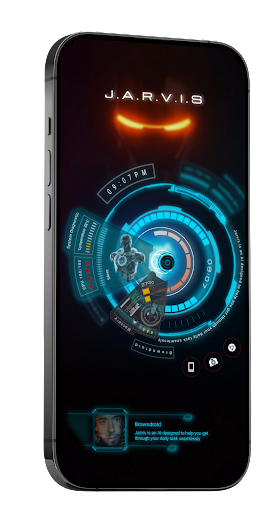
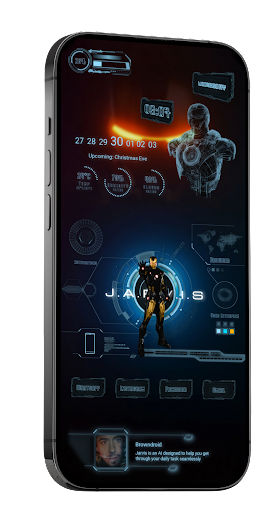
The Jarvis theme is a sleek and sophisticated design that draws inspiration from futuristic aesthetics. Named after the iconic artificial intelligence Jarvis in popular culture, this theme combines modern elements with a touch of sci-fi elegance.
This is not a stand-alone app
You will need the Kustom Live Wallpaper & Kustom Live Wallpaper Pro key to use these Presets.(Paid version of KLWP)
To apply the theme open the app then go to widget section and select the theme you wish to apply
This theme offers Two presets
➤ 3 Pages Ui offers an arc reactor with user details and music control
➤ Tapping on the Arc Reactor on the second page gives an expanded Ui view
Requirements:
✔ Kustom (KLWP)PRO https://play.google.com/store/apps/details?id=org.kustom.wallpaper.pro
✔ Compatible launcher supported by KLWP (Nova launcher is recommended)
How to install the theme:
✔ Download and Install Jarvis for Klwp
✔ Open the app go to the Widget section and tap on the theme you wish to apply or Open your KLWP app, choose menu icon on top left, then load preset
✔ Hit "SAVE" button on the top right
✔ Set as a Homescreen Wallpaper
Instructions:
Nova launcher settings
✔ select 3 blank screen
✔ set wallpaper scrolling
✔ hide status bar and dock
✔ Set Page indicator and search bar to none
If you have any questions suggestions or feedback, feel free to reach me at the following channels:
➧ Instagram: https://www.instagram.com/browndroid_/
➧ Reddit: https://www.reddit.com/u/browndroid_
➧ Youtube: https://youtube.com/@Browndroid
➧ Email: browndroid.yt@gmail.com
Credits for Kuper: https://github.com/jahirfiquitiva
This is not a stand-alone app
You will need the Kustom Live Wallpaper & Kustom Live Wallpaper Pro key to use these Presets.(Paid version of KLWP)
To apply the theme open the app then go to widget section and select the theme you wish to apply
This theme offers Two presets
➤ 3 Pages Ui offers an arc reactor with user details and music control
➤ Tapping on the Arc Reactor on the second page gives an expanded Ui view
Requirements:
✔ Kustom (KLWP)PRO https://play.google.com/store/apps/details?id=org.kustom.wallpaper.pro
✔ Compatible launcher supported by KLWP (Nova launcher is recommended)
How to install the theme:
✔ Download and Install Jarvis for Klwp
✔ Open the app go to the Widget section and tap on the theme you wish to apply or Open your KLWP app, choose menu icon on top left, then load preset
✔ Hit "SAVE" button on the top right
✔ Set as a Homescreen Wallpaper
Instructions:
Nova launcher settings
✔ select 3 blank screen
✔ set wallpaper scrolling
✔ hide status bar and dock
✔ Set Page indicator and search bar to none
If you have any questions suggestions or feedback, feel free to reach me at the following channels:
➧ Instagram: https://www.instagram.com/browndroid_/
➧ Reddit: https://www.reddit.com/u/browndroid_
➧ Youtube: https://youtube.com/@Browndroid
➧ Email: browndroid.yt@gmail.com
Credits for Kuper: https://github.com/jahirfiquitiva
Developer email
browndroid.yt@gmail.com
Released
Dec 4, 2023
Current version
3.0
Android version
5.0
Screenshots