BazyArt : Photo Art Generator
Code Quality Insights

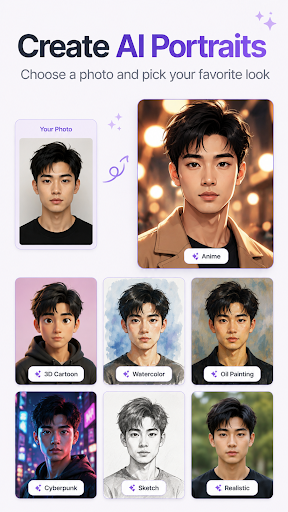
Turn your photos into creative AI portraits and polished edits with AI Art Generator: Photo Editor. Choose a photo, select a style or tool, and create a new look through a simple guided flow.
AI PORTRAITS & ART STYLES
• Explore AI portraits and creative visual styles
• Try anime, art, cartoon, clay, cosplay, fantasy, vintage and other curated looks
• Transform your photos without complicated editing controls
AI PHOTO EDITOR TOOLS
• Restore photos
• Enhance photo quality
• Retouch faces
• Preview face aging
• Change hairstyles and outfits
• Remove image backgrounds
• Brush over unwanted areas with the object remover
A SIMPLE PHOTO WORKFLOW
1. Select a photo with the system photo picker
2. Choose an AI style or editing tool
3. Wait for your AI-generated result
4. Save the finished image to your gallery
Whether you want an AI portrait, an anime-style photo, a cleaner background, a restored picture or a refreshed look, the app brings AI art generation and practical photo editing tools together in one place.
An internet connection is required for AI processing. Results may vary depending on the source photo and selected style.
AI PORTRAITS & ART STYLES
• Explore AI portraits and creative visual styles
• Try anime, art, cartoon, clay, cosplay, fantasy, vintage and other curated looks
• Transform your photos without complicated editing controls
AI PHOTO EDITOR TOOLS
• Restore photos
• Enhance photo quality
• Retouch faces
• Preview face aging
• Change hairstyles and outfits
• Remove image backgrounds
• Brush over unwanted areas with the object remover
A SIMPLE PHOTO WORKFLOW
1. Select a photo with the system photo picker
2. Choose an AI style or editing tool
3. Wait for your AI-generated result
4. Save the finished image to your gallery
Whether you want an AI portrait, an anime-style photo, a cleaner background, a restored picture or a refreshed look, the app brings AI art generation and practical photo editing tools together in one place.
An internet connection is required for AI processing. Results may vary depending on the source photo and selected style.
Developer email
maginaflor@gmail.com
Developer website
https://b002-bven-file-recovery.web.appReleased
Oct 9, 2026
Current version
1.1.2
Android version
7.0
Screenshots