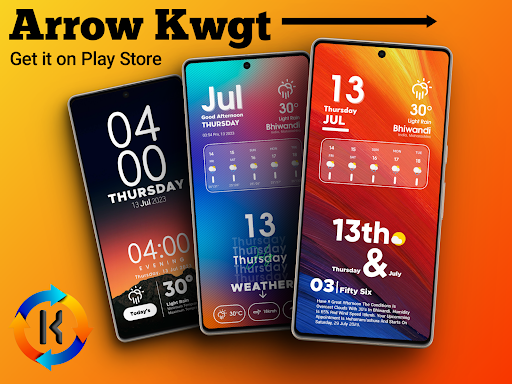
Arrow KWGT
Ahmad Ansari

5.0 stars50 reviews1,000+$1.49
PersonalizationEveryoneVersion 1.1.6Updated 1/23/2026, 10:55:54 AM
Open in StoreATTENTION
This is not a stand-alone app. Arrow KWGT requires KWGT Pro [PAID APPLICATION].
Dove KWGT is Made For futuristic and Beautiful Home Screens.
How to set up the widgets?
You Need to download 2 apps
1. KWGT: https://play.google.com/store/apps/details?id=org.kustom.widget&hl=en_IN
2. KWGT Pro Key: https://play.google.com/store/apps/details?id=org.kustom.widget.pro&hl=en_IN
Used
Some Popular launcher Nova, Lawnchair, Smart Launcher 5, etc.
How to Use :
1. DOWNLOAD Arrow KWGT & KWGT Pro Application
2. Long tap on your home screen & choose the widget option
3. Choose the KWGT widget from the drop-down list
4. Tap on the widget, choose installed & select Dove KWGT
5. Choose the widget you like & adjust scaling as per the home screen
6. Congratulations! You are good to go.
NOTE:
If a particular widget is not properly scaled, you can adjust the size with 'SCALE' under the layer option in the KWGT main editor.
Credits: -
- Jahir Fiquitiva for creating Kuper Dashboard which allows for easy app making
✅ Follow Me For More ✅
Twitter :-🐥
https://twitter.com/Ahmadansari2233?s=09
Instagram :-📷
https://www.instagram.com/ahmadhacker45/
Facebook :-🧒
https://m.facebook.com/ahmad.ansari.52/about
This is not a stand-alone app. Arrow KWGT requires KWGT Pro [PAID APPLICATION].
Dove KWGT is Made For futuristic and Beautiful Home Screens.
How to set up the widgets?
You Need to download 2 apps
1. KWGT: https://play.google.com/store/apps/details?id=org.kustom.widget&hl=en_IN
2. KWGT Pro Key: https://play.google.com/store/apps/details?id=org.kustom.widget.pro&hl=en_IN
Used
Some Popular launcher Nova, Lawnchair, Smart Launcher 5, etc.
How to Use :
1. DOWNLOAD Arrow KWGT & KWGT Pro Application
2. Long tap on your home screen & choose the widget option
3. Choose the KWGT widget from the drop-down list
4. Tap on the widget, choose installed & select Dove KWGT
5. Choose the widget you like & adjust scaling as per the home screen
6. Congratulations! You are good to go.
NOTE:
If a particular widget is not properly scaled, you can adjust the size with 'SCALE' under the layer option in the KWGT main editor.
Credits: -
- Jahir Fiquitiva for creating Kuper Dashboard which allows for easy app making
✅ Follow Me For More ✅
Twitter :-🐥
https://twitter.com/Ahmadansari2233?s=09
Instagram :-📷
https://www.instagram.com/ahmadhacker45/
Facebook :-🧒
https://m.facebook.com/ahmad.ansari.52/about
Developer email
ahmadhacker45@gmail.com
Released
Jul 13, 2023
Current version
1.1.6
Android version
6.0
Reviews & Ratings
5.0
out of 5
5
4
3
2
1
🌟 Loved by users
50 reviewsScreenshots