WiFi Analyzer: WiFi Manager
Smart Code Studios

4.4 stars1,423 reviews1,000,000+Free
ProductivityEveryoneVersion 7.6Updated 1/20/2026, 11:15:56 AM
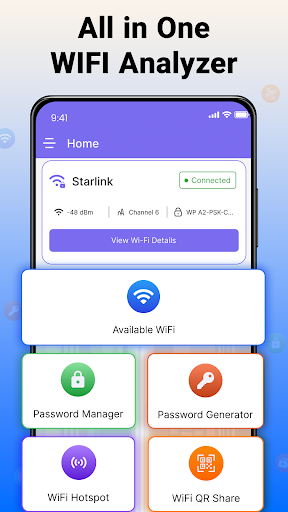
Open in StoreStay connected, manage access, and control your digital tools with ease using the WIFI Analyzer Password Manager. This all-in-one utility brings together essential features that help you analyze Wi-Fi networks, generate and store secure passwords, share the internet via hotspot, and scan QR code. Whether you’re at home, in the office, or on the go, it offers simple tools designed for daily use.
Main Features of WIFI Analyzer Password Manager:
● WIFI Hotspot
● Password Generator
● Password Manager
● Scan QR Code
WIFI Hotspot: Use your device as a wi-fi hotspot and share the internet securely. See connected devices in real time and control their access easily. The wi-fi hotspot feature is useful for quick sharing without the need for a complex setup.
Password Manager and Generator: Create strong, unique passwords with the password generator and keep them organized in the password manager. Store login credentials safely and retrieve them whenever needed. With both features combined, you manage all your passwords in one secure place.
Scan QR Code: Use your device camera to scan QR codes for Wi-Fi networks and connect instantly. This built-in makes network access fast and reliable without manual input.
Benefits of the Wi-Fi Analyzer Password Manager:
● Use Wi-Fi analyzer to check nearby WIFI channels and signal strength
● Share the internet by enabling a WIFI hotspot on your device
● Generate strong passwords and securely manage them in one place
● Connect to Wi-Fi networks by scanning QR codes
Download now and experience the complete feature set of WIFI Analyzer Password Manager on your device.
Main Features of WIFI Analyzer Password Manager:
● WIFI Hotspot
● Password Generator
● Password Manager
● Scan QR Code
WIFI Hotspot: Use your device as a wi-fi hotspot and share the internet securely. See connected devices in real time and control their access easily. The wi-fi hotspot feature is useful for quick sharing without the need for a complex setup.
Password Manager and Generator: Create strong, unique passwords with the password generator and keep them organized in the password manager. Store login credentials safely and retrieve them whenever needed. With both features combined, you manage all your passwords in one secure place.
Scan QR Code: Use your device camera to scan QR codes for Wi-Fi networks and connect instantly. This built-in makes network access fast and reliable without manual input.
Benefits of the Wi-Fi Analyzer Password Manager:
● Use Wi-Fi analyzer to check nearby WIFI channels and signal strength
● Share the internet by enabling a WIFI hotspot on your device
● Generate strong passwords and securely manage them in one place
● Connect to Wi-Fi networks by scanning QR codes
Download now and experience the complete feature set of WIFI Analyzer Password Manager on your device.
Developer email
explore3dmaps@gmail.com
Developer website
https://lc43a8bea.app-ads-txt.com/Released
Nov 3, 2022
Current version
7.6
Android version
7.0
Reviews & Ratings
4.4
out of 5
5
4
3
2
1
😊 Highly rated by users
1,423 reviewsScreenshots