InfoGraph 2: Watch face
amoledwatchfaces™

4.5 stars90 reviews5,000+$1.99
ProductivityEveryoneVersion VARYUpdated 9/13/2025, 7:15:07 AM
Open in StoreOnly for Wear OS 4+ devices
// Not suitable for rectangular watches
Powered by Watch Face Format
amoledwatchfaces.com
BUY ONE GET ONE OFFER!
amoledwatchfaces.com/bogo
CUSTOM COMPLICATION APPS
amoledwatchfaces.com/apps
FEATURES
• Watch Face Format 1 / 2
• three different types of progress bars
• custom complications with different types
• unique ambient mode with low OPR & adaptive color
• Hollow AOD option (Outlined font)
• Arc complications (RANGED_VALUE, LONG_TEXT)
• burn-in protection
• PNGQuant optimized layers > battery friendly
• true black background
• high resolution
• wear os 5 flavors
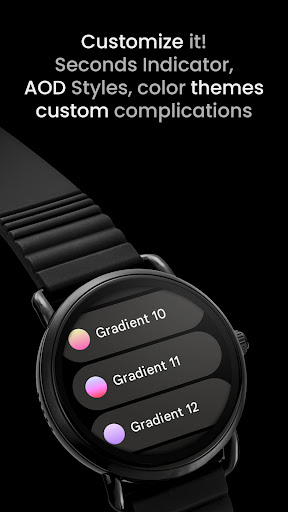
• beautiful color themes & gradients
• make it your own, customize each progress bar gradient individually!
USER CONFIGURATIONS
• AOD (Style - 2x)
• Slot 1 Theme (White, Tint, 20 Gradients)
• Slot 2 Theme (White, Tint, 20 Gradients)
• Slot 3 Theme (White, Tint, 20 Gradients)
• Slot 4 Theme (White, Tint, 20 Gradients)
• Material Theme (50+ Colors)
• Custom Complication (8x)
• Seconds Indicator (Toggle)
• Hollow AOD (Toggle)
Installation and troubleshooting guide
amoledwatchfaces.com/guide
Please send any issues reports or help requests to our support address
support@amoledwatchfaces.com
Join our Telegram group for live support and discussion
t.me/amoledwatchfaces
Newsletter
amoledwatchfaces.com/contact#newsletter
amoledwatchfaces™ - Awf
// Not suitable for rectangular watches
Powered by Watch Face Format
amoledwatchfaces.com
BUY ONE GET ONE OFFER!
amoledwatchfaces.com/bogo
CUSTOM COMPLICATION APPS
amoledwatchfaces.com/apps
FEATURES
• Watch Face Format 1 / 2
• three different types of progress bars
• custom complications with different types
• unique ambient mode with low OPR & adaptive color
• Hollow AOD option (Outlined font)
• Arc complications (RANGED_VALUE, LONG_TEXT)
• burn-in protection
• PNGQuant optimized layers > battery friendly
• true black background
• high resolution
• wear os 5 flavors
• beautiful color themes & gradients
• make it your own, customize each progress bar gradient individually!
USER CONFIGURATIONS
• AOD (Style - 2x)
• Slot 1 Theme (White, Tint, 20 Gradients)
• Slot 2 Theme (White, Tint, 20 Gradients)
• Slot 3 Theme (White, Tint, 20 Gradients)
• Slot 4 Theme (White, Tint, 20 Gradients)
• Material Theme (50+ Colors)
• Custom Complication (8x)
• Seconds Indicator (Toggle)
• Hollow AOD (Toggle)
Installation and troubleshooting guide
amoledwatchfaces.com/guide
Please send any issues reports or help requests to our support address
support@amoledwatchfaces.com
Join our Telegram group for live support and discussion
t.me/amoledwatchfaces
Newsletter
amoledwatchfaces.com/contact#newsletter
amoledwatchfaces™ - Awf
Developer email
support@amoledwatchfaces.com
Developer website
https://amoledwatchfaces.comReleased
Dec 6, 2023
Current version
VARY
Android version
VARY
Reviews & Ratings
4.5
out of 5
5
4
3
2
1
😊 Highly rated by users
90 reviewsScreenshots