NFC Tag Tools Pro
Alor Feri Limited

NFC Tag Tools Pro is an NFC reader, NFC writer, NFC tag copier, profile manager and QR toolkit for Android. Read multi-record tags, edit NDEF records, copy tag content, save reusable profiles, inspect NTAG memory, scan QR codes and create custom QR codes in one app.
NFC READER
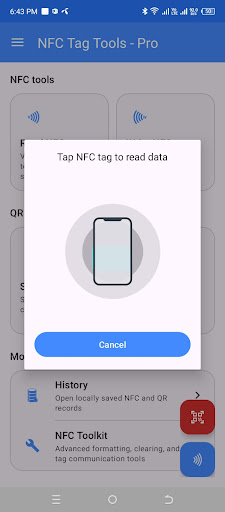
Scan compatible NFC cards, stickers, labels and tags to view:
• Ordered NDEF records
• Text, URL, phone, SMS, email, Wi-Fi, contact and location data
• Tag ID, NFC technologies, capacity and writable status
• Record counts and encoded size
• Unsupported records as locked read-only items
MULTI-RECORD NFC EDITOR & WRITER
Import an existing NFC tag and edit the complete document. Add, edit or remove supported records while preserving their order. Unsupported records remain locked and preserved.
Write Text, URL, Phone, SMS, Email, Wi-Fi, Contact / vCard and Location records. Compatibility, writability and capacity are checked before writing.
COPY & CLONE NFC TAG CONTENT
Copy the complete NDEF message from one compatible NFC tag to another while preserving record order and unsupported records.
• Guided source-to-destination workflow
• Same-source-tag protection
• Copy Again without rescanning
• Continuous Copy mode for multiple tags
• Success and failure counters
• Capacity and read-only checks
The app copies NDEF content only. It does not clone tag UIDs, payment cards, access credentials, protected sectors or raw security data.
NFC PROFILES
Create reusable multi-record NFC profiles.
• Save scanned or edited documents as profiles
• Create profiles from scratch
• Edit, rename, duplicate and delete profiles
• Write profiles directly to compatible NFC tags
• Preserve ordered supported and locked records
NFC HISTORY
Multi-record scans are saved locally as one History item. Reopen saved documents to inspect records, generate QR codes, write one record or write the complete document again.
NTAG MEMORY READER
Inspect compatible NTAG213, NTAG215 and NTAG216 memory with:
• Searchable HEX and ASCII views
• Page-by-page display
• Partial-read handling
• TXT, HEX and BIN export
MANAGE NFC TAGS
Use scan-first tools for supported tags:
• Format compatible tags as NDEF
• Erase writable NDEF content
• Clear supported user memory and recreate an empty NDEF structure
• Permanently make a compatible tag read-only
• Experimental NTAG21x password protection
• Set, verify, change and remove an eight-digit HEX password
Sensitive or destructive operations require warnings, confirmation and another touch of the same inspected tag.
ADVANCED NFC COMMANDS
Use a workspace for supported NFC technologies:
• NfcA custom transceive
• NfcV custom transceive
• IsoDep APDU command transceive
• HEX validation, repeat, clear and response copy
• Response timing and byte counts
• Memory-only recent command history
QR SCANNER & QR GENERATOR
• Scan QR codes with the camera or gallery images
• Generate QR codes for text, websites, Wi-Fi, contacts, phone, email, SMS and location
• Convert supported QR content into editable NFC records
• Save NFC and QR content locally for reuse
CUSTOM QR CODE MAKER
Create custom QR codes with colors, gradients, module shapes, eye styles and logos. Add a built-in logo or crop your own image, preview the result, export PNG images and share generated QR codes.
SOCIAL LINK BUILDER
Create supported social profile links and use them with NFC records or QR codes.
IMPORTANT NOTES
NFC features require an Android device with NFC hardware. Some tags may be read-only, locked, protected or unsupported. Password, memory-clearing, formatting and permanent read-only operations should be used carefully. QR tools work without NFC hardware.
NFC READER
Scan compatible NFC cards, stickers, labels and tags to view:
• Ordered NDEF records
• Text, URL, phone, SMS, email, Wi-Fi, contact and location data
• Tag ID, NFC technologies, capacity and writable status
• Record counts and encoded size
• Unsupported records as locked read-only items
MULTI-RECORD NFC EDITOR & WRITER
Import an existing NFC tag and edit the complete document. Add, edit or remove supported records while preserving their order. Unsupported records remain locked and preserved.
Write Text, URL, Phone, SMS, Email, Wi-Fi, Contact / vCard and Location records. Compatibility, writability and capacity are checked before writing.
COPY & CLONE NFC TAG CONTENT
Copy the complete NDEF message from one compatible NFC tag to another while preserving record order and unsupported records.
• Guided source-to-destination workflow
• Same-source-tag protection
• Copy Again without rescanning
• Continuous Copy mode for multiple tags
• Success and failure counters
• Capacity and read-only checks
The app copies NDEF content only. It does not clone tag UIDs, payment cards, access credentials, protected sectors or raw security data.
NFC PROFILES
Create reusable multi-record NFC profiles.
• Save scanned or edited documents as profiles
• Create profiles from scratch
• Edit, rename, duplicate and delete profiles
• Write profiles directly to compatible NFC tags
• Preserve ordered supported and locked records
NFC HISTORY
Multi-record scans are saved locally as one History item. Reopen saved documents to inspect records, generate QR codes, write one record or write the complete document again.
NTAG MEMORY READER
Inspect compatible NTAG213, NTAG215 and NTAG216 memory with:
• Searchable HEX and ASCII views
• Page-by-page display
• Partial-read handling
• TXT, HEX and BIN export
MANAGE NFC TAGS
Use scan-first tools for supported tags:
• Format compatible tags as NDEF
• Erase writable NDEF content
• Clear supported user memory and recreate an empty NDEF structure
• Permanently make a compatible tag read-only
• Experimental NTAG21x password protection
• Set, verify, change and remove an eight-digit HEX password
Sensitive or destructive operations require warnings, confirmation and another touch of the same inspected tag.
ADVANCED NFC COMMANDS
Use a workspace for supported NFC technologies:
• NfcA custom transceive
• NfcV custom transceive
• IsoDep APDU command transceive
• HEX validation, repeat, clear and response copy
• Response timing and byte counts
• Memory-only recent command history
QR SCANNER & QR GENERATOR
• Scan QR codes with the camera or gallery images
• Generate QR codes for text, websites, Wi-Fi, contacts, phone, email, SMS and location
• Convert supported QR content into editable NFC records
• Save NFC and QR content locally for reuse
CUSTOM QR CODE MAKER
Create custom QR codes with colors, gradients, module shapes, eye styles and logos. Add a built-in logo or crop your own image, preview the result, export PNG images and share generated QR codes.
SOCIAL LINK BUILDER
Create supported social profile links and use them with NFC records or QR codes.
IMPORTANT NOTES
NFC features require an Android device with NFC hardware. Some tags may be read-only, locked, protected or unsupported. Password, memory-clearing, formatting and permanent read-only operations should be used carefully. QR tools work without NFC hardware.
Developer email
info@initcard.com
Developer website
https://initcard.comReleased
Sep 24, 2024
Current version
3.0.0
Android version
7.0
Screenshots