Gallery AI Pro - Photo Enhance
Abk Tech

Here's the full updated description with both new features woven in naturally and optimized for ASO:
Gallery AI Pro – Photo Enhance is the smartest AI-powered photo gallery, editor, and secure vault app for Android. Organize, enhance, and protect every memory with one powerful tool.
Whether you need a private photo vault, an AI object eraser, a one-tap 4K upscaler, or an old photo colorizer — Gallery AI Pro replaces five apps with one.
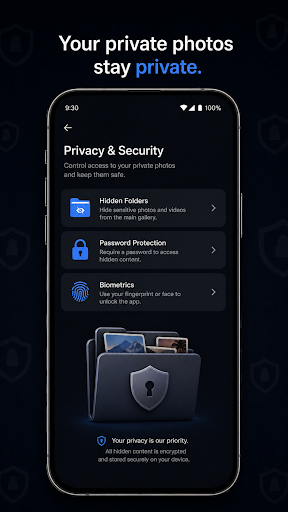
🔒 SECURE PHOTO VAULT & HIDDEN FOLDER
Keep your most private photos and videos completely hidden from prying eyes — and from your system gallery.
Private Vault with Biometric Lock — Fingerprint & face unlock for instant, secure access
PIN-Protected Hidden Albums — Invisible to other apps and the system media scanner
AES Military-Grade Encryption — Industry-standard protection for every file
Disguise Mode — Camouflage the vault so it doesn't appear as a gallery at all
Gallery AI Pro's vault is truly isolated — your hidden photos won't appear in Google Photos, Files, or any third-party app.
🪄 AI PHOTO ENHANCER, UPSCALER & RESTORER
Remove anything. Enhance everything. Restore the irreplaceable. No desktop software needed.
Magic Eraser — Tap to instantly remove people, photobombers, wires, or watermarks
AI Background Fill — Generative AI reconstructs the removed area seamlessly
AI Blur Fix & 4K Upscaler — Transform any blurry, pixelated, or low-resolution photo into a razor-sharp, full 4K image in seconds. Works on old scans, screenshots, and compressed images
AI Old Photo Colorizer — Bring black & white photos back to life with true, realistic color. Restore faded family portraits, vintage snapshots, and historical images as if they were taken today in full color
AI Photo Remix — Transform ordinary shots into stunning artistic styles
Once-blurry memories and century-old black & white photos restored to vivid, full-color 4K quality — all on your phone.
🔍 SMART AI SEARCH & AUTO-ORGANIZATION
Stop scrolling. Start finding.
Natural Language Search — Type "beach sunset," "dog," or "birthday cake" to find photos instantly
Smart Albums — Screenshots, Favorites, Recents, and custom collections, always up to date
Faster Indexing — Outperforms your default system gallery on search speed
✏️ FULL PRO EDITING SUITE
A complete creative studio inside your gallery.
Precision Crop, Rotate & Straighten
Professional Filters & Tone Adjustments (Brightness, Contrast, Saturation, Warmth)
Draw, Annotate & Add Text directly on photos
Lossless 4K Export — Save every enhanced photo at maximum resolution without any compression
☁️ PRIVACY-FIRST AI PROCESSING
Your photos belong to you — always.
AI features use ephemeral (temporary) processing — your images are never permanently stored on external servers
No silent uploads. What stays on your device, stays on your device
Full transparency on what data is used and why
💎 WHY GALLERY AI PRO?
✅ Ad-Free Experience in Pro — no interruptions, ever
✅ 4K Photo Upscaling — turn any blurry photo into a sharp, high-definition masterpiece
✅ Old Photo Colorization — restore black & white family memories with realistic AI color
✅ Lightweight & Fast — optimized for all Android devices, including budget phones
✅ Glassmorphic Dark UI — beautiful modern design inspired by premium gallery aesthetics
✅ All-in-One — replaces your gallery, vault, eraser, colorizer, and photo editor in a single app
✅ Regular Updates — new AI features added continuously
📲 THE SMARTER GALLERY YOU'VE BEEN WAITING FOR
Got a blurry wedding photo from 10 years ago? A faded black & white portrait of your grandparents? A compressed screenshot you wish was crisp? Gallery AI Pro fixes all of it — instantly, privately, on your phone.
Download Gallery AI Pro – Photo Enhance today and give every photo the quality it deserves.
Gallery AI Pro – Photo Enhance is the smartest AI-powered photo gallery, editor, and secure vault app for Android. Organize, enhance, and protect every memory with one powerful tool.
Whether you need a private photo vault, an AI object eraser, a one-tap 4K upscaler, or an old photo colorizer — Gallery AI Pro replaces five apps with one.
🔒 SECURE PHOTO VAULT & HIDDEN FOLDER
Keep your most private photos and videos completely hidden from prying eyes — and from your system gallery.
Private Vault with Biometric Lock — Fingerprint & face unlock for instant, secure access
PIN-Protected Hidden Albums — Invisible to other apps and the system media scanner
AES Military-Grade Encryption — Industry-standard protection for every file
Disguise Mode — Camouflage the vault so it doesn't appear as a gallery at all
Gallery AI Pro's vault is truly isolated — your hidden photos won't appear in Google Photos, Files, or any third-party app.
🪄 AI PHOTO ENHANCER, UPSCALER & RESTORER
Remove anything. Enhance everything. Restore the irreplaceable. No desktop software needed.
Magic Eraser — Tap to instantly remove people, photobombers, wires, or watermarks
AI Background Fill — Generative AI reconstructs the removed area seamlessly
AI Blur Fix & 4K Upscaler — Transform any blurry, pixelated, or low-resolution photo into a razor-sharp, full 4K image in seconds. Works on old scans, screenshots, and compressed images
AI Old Photo Colorizer — Bring black & white photos back to life with true, realistic color. Restore faded family portraits, vintage snapshots, and historical images as if they were taken today in full color
AI Photo Remix — Transform ordinary shots into stunning artistic styles
Once-blurry memories and century-old black & white photos restored to vivid, full-color 4K quality — all on your phone.
🔍 SMART AI SEARCH & AUTO-ORGANIZATION
Stop scrolling. Start finding.
Natural Language Search — Type "beach sunset," "dog," or "birthday cake" to find photos instantly
Smart Albums — Screenshots, Favorites, Recents, and custom collections, always up to date
Faster Indexing — Outperforms your default system gallery on search speed
✏️ FULL PRO EDITING SUITE
A complete creative studio inside your gallery.
Precision Crop, Rotate & Straighten
Professional Filters & Tone Adjustments (Brightness, Contrast, Saturation, Warmth)
Draw, Annotate & Add Text directly on photos
Lossless 4K Export — Save every enhanced photo at maximum resolution without any compression
☁️ PRIVACY-FIRST AI PROCESSING
Your photos belong to you — always.
AI features use ephemeral (temporary) processing — your images are never permanently stored on external servers
No silent uploads. What stays on your device, stays on your device
Full transparency on what data is used and why
💎 WHY GALLERY AI PRO?
✅ Ad-Free Experience in Pro — no interruptions, ever
✅ 4K Photo Upscaling — turn any blurry photo into a sharp, high-definition masterpiece
✅ Old Photo Colorization — restore black & white family memories with realistic AI color
✅ Lightweight & Fast — optimized for all Android devices, including budget phones
✅ Glassmorphic Dark UI — beautiful modern design inspired by premium gallery aesthetics
✅ All-in-One — replaces your gallery, vault, eraser, colorizer, and photo editor in a single app
✅ Regular Updates — new AI features added continuously
📲 THE SMARTER GALLERY YOU'VE BEEN WAITING FOR
Got a blurry wedding photo from 10 years ago? A faded black & white portrait of your grandparents? A compressed screenshot you wish was crisp? Gallery AI Pro fixes all of it — instantly, privately, on your phone.
Download Gallery AI Pro – Photo Enhance today and give every photo the quality it deserves.
Developer email
abdoulazizyoussouf7@gmail.com
Developer website
https://galleryai-vertex.web.app/Released
Jun 16, 2026
Current version
6.2.1
Android version
8.0
Screenshots