SPConnect
AcquiredNotions Inc.

3.7 stars463 reviews50,000+Free
BusinessEveryoneVersion 1.17Updated 10/25/2024, 5:19:41 PM
Open in StoreAccess Microsoft SharePoint sites from your Android phone or tablet. Collaborate with your team on the go.
Review and update documents in document libraries on your ride home.
Schedule meetings in the team calendar or just post a team announcement.
No server side software is necessary. In most cases, if you can access Microsoft SharePoint from your Android device, you can connect from SPConnect.
Please email feedback, recommendations and features requests to improve this product,
Android System Requirements:
- External Storage for caching files.
- A document viewer to view or modify documents.
Supported versions: 2010, 2013, 2016, Office 365
Supported Authentication Methods:
- Integrated Windows Authentication (includes SSL)
- Forms Based Authentication (includes SSL)
- Claims Based Authentication
Features List
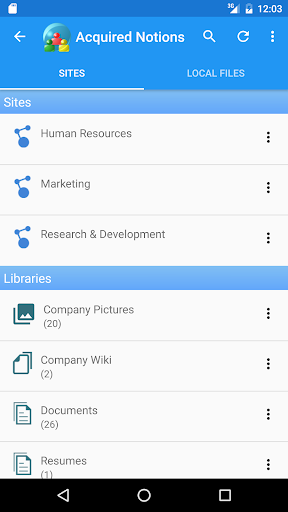
- Browse Microsoft SharePoint sites and sub sites.
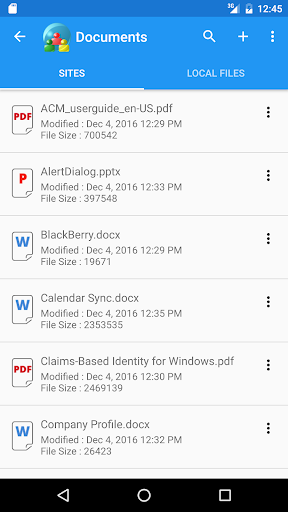
- View or modify documents in Document Libraries.
- Download document to local storage for offline viewing and updating.
- Check out and check in documents.
- Search document content (search indexing must be enabled on the server).
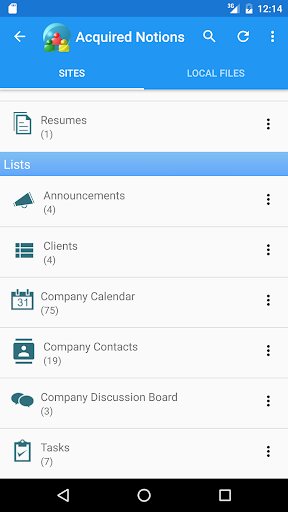
- Support for Document Libraries, Picture Libraries, Custom Lists, Calendars, Tasks, Discussions, Announcements.
Calendar sync: Sync SharePoint calendar events to the Android calendar (In-App subscription is required, free trial).
Contacts sync: Sync SharePoint contacts to the Android contacts list. (In-App subscription is required, free trial).
Review and update documents in document libraries on your ride home.
Schedule meetings in the team calendar or just post a team announcement.
No server side software is necessary. In most cases, if you can access Microsoft SharePoint from your Android device, you can connect from SPConnect.
Please email feedback, recommendations and features requests to improve this product,
Android System Requirements:
- External Storage for caching files.
- A document viewer to view or modify documents.
Supported versions: 2010, 2013, 2016, Office 365
Supported Authentication Methods:
- Integrated Windows Authentication (includes SSL)
- Forms Based Authentication (includes SSL)
- Claims Based Authentication
Features List
- Browse Microsoft SharePoint sites and sub sites.
- View or modify documents in Document Libraries.
- Download document to local storage for offline viewing and updating.
- Check out and check in documents.
- Search document content (search indexing must be enabled on the server).
- Support for Document Libraries, Picture Libraries, Custom Lists, Calendars, Tasks, Discussions, Announcements.
Calendar sync: Sync SharePoint calendar events to the Android calendar (In-App subscription is required, free trial).
Contacts sync: Sync SharePoint contacts to the Android contacts list. (In-App subscription is required, free trial).
Developer email
spconnect@acquirednotions.com
Developer website
http://www.acquirednotions.comReleased
Jan 29, 2013
Current version
1.17
Android version
4.0.3
Reviews & Ratings
3.7
out of 5
5
4
3
2
1
😐 Reviews are mixed
463 reviewsScreenshots