Pulsenmore
PulseNMore

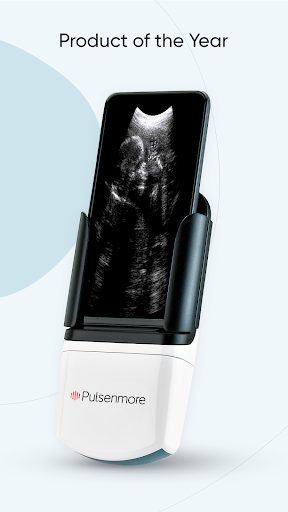
This app enables you to perform ultrasound scans at home for remote review by clinicians. To perform a scan using this app, you need the Pulsenmore handheld ultrasound device and an activation key from your healthcare provider.
MODES OF OPERATION
The App-Guided Mode provides easy-to-follow video tutorials, showing you how to complete an ultrasound scan in just a few minutes. The images from each scan are automatically uploaded to the cloud and reviewed by clinicians.
The Clinician-Guided Mode enables a telehealth session with a clinician who reviews your scan in real time, guiding you remotely as you operate the Pulsenmore ultrasound device.
SIMPLE TO USE - With the app’s easy-to-follow video tutorials or guidance via live telehealth session, every user can easily operate the Pulsenmore ultrasound device.
CLINICIAN FEEDBACK FOR EVERY SCAN - Whether uploaded to the cloud or viewed in real time, your scans are assessed by clinical professionals.
RELIABLE AND SAFE - The Pulsenmore ultrasound device and app are clinically validated.
ADDITIONAL INFORMATION – The minimum requirements for your smartphone can be found at https://pulsenmore.com/supporteddevices
For more information visit https://pulsenmore.com
MODES OF OPERATION
The App-Guided Mode provides easy-to-follow video tutorials, showing you how to complete an ultrasound scan in just a few minutes. The images from each scan are automatically uploaded to the cloud and reviewed by clinicians.
The Clinician-Guided Mode enables a telehealth session with a clinician who reviews your scan in real time, guiding you remotely as you operate the Pulsenmore ultrasound device.
SIMPLE TO USE - With the app’s easy-to-follow video tutorials or guidance via live telehealth session, every user can easily operate the Pulsenmore ultrasound device.
CLINICIAN FEEDBACK FOR EVERY SCAN - Whether uploaded to the cloud or viewed in real time, your scans are assessed by clinical professionals.
RELIABLE AND SAFE - The Pulsenmore ultrasound device and app are clinically validated.
ADDITIONAL INFORMATION – The minimum requirements for your smartphone can be found at https://pulsenmore.com/supporteddevices
For more information visit https://pulsenmore.com
Developer email
info@pulsenmore.com
Developer website
https://www.pulsenmore.com/Released
Nov 16, 2020
Current version
4.6.0
Android version
VARY
Screenshots