KKCard 名片管家
KKSDesign

KKCard is a fully functional digital business card management application designed for business professionals and sales workers. Utilizing advanced OCR (Optical Character Recognition) technology, it allows you to quickly convert physical business cards into digital information, providing comprehensive categorization, search, and backup functions.
📸 Smart Business Card Scanning
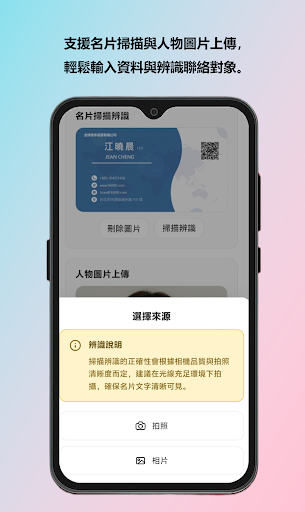
(1) OCR Technology: Automatically recognizes information on business cards, including names in Chinese and English, company names, job titles, phone numbers, emails, and addresses.
(2) Dual Image Management: Supports uploading scanned business cards and photos of the person separately.
(3) Multiple Source Options: Allows you to choose between taking photos or selecting images from your album.
(4) Automatic Compression Optimization: Automatically compresses images to save storage space.
🗂️ Category Management System
(1) Multiple Categories: A business card can belong to multiple categories.
(2) Flexible Creation: Freely add, edit, and delete categories.
(3) Smart Filtering: Quickly switch between different categories to view business cards.
(4) Category Statistics: Real-time display of the number of business cards in each category.
🔍 Powerful Search Functions
(1) Full-Text Search: Search all fields including name, company, title, phone number, email, and address.
(2) Instant Search: Enter keywords to instantly view results.
(3) Search Result Highlighting: Quickly locate target business cards.
💾 Backup and Restore
(1) Complete Data Backup: Offline complete backup of all business cards.
(2) One-Click Restore: Quickly restore all data from the backup file.
(3) Data Verification Mechanism: Automatically checks file format and content correctness before restoration.
(4) Error Tolerance: Automatically skips incorrectly formatted data and displays a statistical report.
🚀 Performance Optimization
(1) Infinite Scrolling Loading: Employs virtual scrolling technology for smooth handling of large numbers of business cards.
(2) Thumbnail Technology: List display uses thumbnails to speed up rendering.
(3) Offline Storage: All data is stored locally, requiring no network connection.
📱 Mobile Device Optimization
(1) Responsive Design: Perfectly supports various devices such as mobile phones, tablets, and computers.
(2) Touch Operation: Optimized interface for touch screens.
(3) Gesture Operation Support: Supports intuitive gestures such as swipes and clicks.
(4) Modern Design: Adopts a minimalist Material Design style.
(5) Intuitive Operation: Clear visual hierarchy and operation flow.
(6) Dynamic Feedback: Rich visual feedback such as loading animations, skeleton screens, and Toast notifications.
🔒 Privacy Protection
(1) Local Storage: All data is stored on your device.
(2) No Cloud Sync: No personal data is uploaded to the server.
(3) Complete Control: You can export or delete all data at any time.
*** Use Cases ***
✅ Business Development: Quickly build a customer business card database and look up contact information at any time.
✅ Business Meetings: Scan business cards immediately after the meeting to avoid losing important contacts. ✅ Contact Management: Categorize contacts by industry, region, and job title.
✅ Team Collaboration: Export backup files and share business card information with team members.
✅ Data Backup: Regularly back up important business card information to prevent data loss.
*** Technical Features ***
(1) Full offline functionality support
(2) Efficient image compression algorithm
(3) Intelligent OCR recognition engine
(4) Rigorous data verification mechanism
*** Precautions ***
(1) It is recommended to use the backup function regularly to save data.
(2) OCR recognition results may vary depending on the business card design; manual verification is recommended.
(3) Please create categories for business card management upon first use.
📸 Smart Business Card Scanning
(1) OCR Technology: Automatically recognizes information on business cards, including names in Chinese and English, company names, job titles, phone numbers, emails, and addresses.
(2) Dual Image Management: Supports uploading scanned business cards and photos of the person separately.
(3) Multiple Source Options: Allows you to choose between taking photos or selecting images from your album.
(4) Automatic Compression Optimization: Automatically compresses images to save storage space.
🗂️ Category Management System
(1) Multiple Categories: A business card can belong to multiple categories.
(2) Flexible Creation: Freely add, edit, and delete categories.
(3) Smart Filtering: Quickly switch between different categories to view business cards.
(4) Category Statistics: Real-time display of the number of business cards in each category.
🔍 Powerful Search Functions
(1) Full-Text Search: Search all fields including name, company, title, phone number, email, and address.
(2) Instant Search: Enter keywords to instantly view results.
(3) Search Result Highlighting: Quickly locate target business cards.
💾 Backup and Restore
(1) Complete Data Backup: Offline complete backup of all business cards.
(2) One-Click Restore: Quickly restore all data from the backup file.
(3) Data Verification Mechanism: Automatically checks file format and content correctness before restoration.
(4) Error Tolerance: Automatically skips incorrectly formatted data and displays a statistical report.
🚀 Performance Optimization
(1) Infinite Scrolling Loading: Employs virtual scrolling technology for smooth handling of large numbers of business cards.
(2) Thumbnail Technology: List display uses thumbnails to speed up rendering.
(3) Offline Storage: All data is stored locally, requiring no network connection.
📱 Mobile Device Optimization
(1) Responsive Design: Perfectly supports various devices such as mobile phones, tablets, and computers.
(2) Touch Operation: Optimized interface for touch screens.
(3) Gesture Operation Support: Supports intuitive gestures such as swipes and clicks.
(4) Modern Design: Adopts a minimalist Material Design style.
(5) Intuitive Operation: Clear visual hierarchy and operation flow.
(6) Dynamic Feedback: Rich visual feedback such as loading animations, skeleton screens, and Toast notifications.
🔒 Privacy Protection
(1) Local Storage: All data is stored on your device.
(2) No Cloud Sync: No personal data is uploaded to the server.
(3) Complete Control: You can export or delete all data at any time.
*** Use Cases ***
✅ Business Development: Quickly build a customer business card database and look up contact information at any time.
✅ Business Meetings: Scan business cards immediately after the meeting to avoid losing important contacts. ✅ Contact Management: Categorize contacts by industry, region, and job title.
✅ Team Collaboration: Export backup files and share business card information with team members.
✅ Data Backup: Regularly back up important business card information to prevent data loss.
*** Technical Features ***
(1) Full offline functionality support
(2) Efficient image compression algorithm
(3) Intelligent OCR recognition engine
(4) Rigorous data verification mechanism
*** Precautions ***
(1) It is recommended to use the backup function regularly to save data.
(2) OCR recognition results may vary depending on the business card design; manual verification is recommended.
(3) Please create categories for business card management upon first use.
Developer email
itake.kevin@gmail.com
Released
Nov 21, 2025
Current version
1.6
Android version
7.0
Screenshots