ByZone Fitness: Step Counter
ByTech Solutions LLC

ByZone Fitness: Step Counter app is designed to help users maintain two essential daily health habits: staying hydrated and staying active. This app contains a water reminder and a pedometer, along with a basic daily task streak, workout videos, Diet AI and a simple notepad. The focus is on accuracy, consistency, and ease of use. (Note: This app is for fitness purposes only and does not provide medical advice.)
Pedometer & Step Counter
The app includes a pedometer tracker that records your steps along with detailed walking or running stats. It shows your route on a map, distance covered, average speed, step count, and total time, giving you a complete overview of your activity. All information is presented clearly so you can easily monitor your progress, understand your performance, and stay motivated to reach your daily fitness goals.
Water Reminder & Hydration Reminders
The water reminder app includes a water reminder feature to help users remember to drink water at regular intervals. Using the reminder water option, users can set notification times that match their daily routine. The water drink reminder functions as a practical water tracker & reminder, helping users follow a structured hydration schedule through a clear water time tracker.
Diet AI
The ByZone Fitness: Step Counter app also features a smart Diet AI tool that creates personalized meal plans based on your BMI and body details. It analyzes your information to suggest suitable diet recommendations that match your health goals, whether you want to lose weight, maintain fitness, or improve your lifestyle. It also provides detailed nutrition information for foods, including calories, fats, and proteins, so you can clearly understand what you eat and make better dietary choices every day.
Workout / Exercise Videos
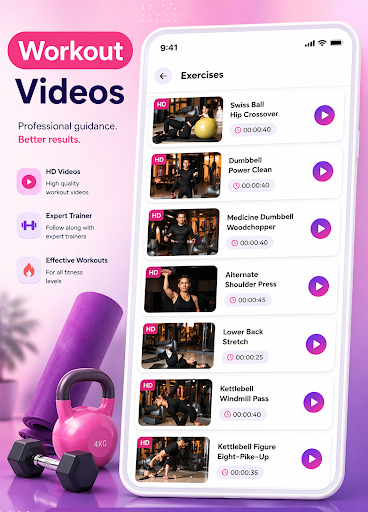
The ByZone Fitness: Step Counter app also includes a collection of workout videos to guide you through exercises step by step. These videos help you perform workouts correctly with proper form and timing, making them suitable for beginners as well as experienced users. You can follow along anytime at home or anywhere you like, making it easier to stay active, learn new exercises, and keep your fitness routine consistent.
.
Tabata Timer
The Tabata timer is a user-friendly training tool designed for individuals seeking efficient, structured, and high-intensity workouts. Whether you are a beginner or a professional athlete, this interval timer helps you stay focused and consistent during every session. With this workout time - HIIT Timer, you can plan, control, and maximize your performance without distractions. This Tabata workout timer is for Tabata training, cardio sessions, and strength workouts. Using the Tabata interval, the app guides you through work and rest phases with clear alerts.
Daily Task Streaks
The water tracker & pedometer app includes a basic streak feature that sets a daily task completion. Streaks only show consecutive days of completion and do not include rewards, scoring systems, or challenges.
Advanced Notepad
An advanced notepad allows users to write and save notes. It can be used to set hydration plans, step goals, or personal reminders, working alongside the water tracker & reminder and pedometer features.
This water tracker & pedometer app includes a water reminder, pedometer, streak reminder, and a notepad in one place. It is suitable for users who want a water reminder app and a pedometer app to support daily health routines.
Perfect For:
HIIT, Tabata, & Circuit Workouts
Running, cycling, & home training
Take control of your training. Start your fitness journey today with ByZone.
Pedometer & Step Counter
The app includes a pedometer tracker that records your steps along with detailed walking or running stats. It shows your route on a map, distance covered, average speed, step count, and total time, giving you a complete overview of your activity. All information is presented clearly so you can easily monitor your progress, understand your performance, and stay motivated to reach your daily fitness goals.
Water Reminder & Hydration Reminders
The water reminder app includes a water reminder feature to help users remember to drink water at regular intervals. Using the reminder water option, users can set notification times that match their daily routine. The water drink reminder functions as a practical water tracker & reminder, helping users follow a structured hydration schedule through a clear water time tracker.
Diet AI
The ByZone Fitness: Step Counter app also features a smart Diet AI tool that creates personalized meal plans based on your BMI and body details. It analyzes your information to suggest suitable diet recommendations that match your health goals, whether you want to lose weight, maintain fitness, or improve your lifestyle. It also provides detailed nutrition information for foods, including calories, fats, and proteins, so you can clearly understand what you eat and make better dietary choices every day.
Workout / Exercise Videos
The ByZone Fitness: Step Counter app also includes a collection of workout videos to guide you through exercises step by step. These videos help you perform workouts correctly with proper form and timing, making them suitable for beginners as well as experienced users. You can follow along anytime at home or anywhere you like, making it easier to stay active, learn new exercises, and keep your fitness routine consistent.
.
Tabata Timer
The Tabata timer is a user-friendly training tool designed for individuals seeking efficient, structured, and high-intensity workouts. Whether you are a beginner or a professional athlete, this interval timer helps you stay focused and consistent during every session. With this workout time - HIIT Timer, you can plan, control, and maximize your performance without distractions. This Tabata workout timer is for Tabata training, cardio sessions, and strength workouts. Using the Tabata interval, the app guides you through work and rest phases with clear alerts.
Daily Task Streaks
The water tracker & pedometer app includes a basic streak feature that sets a daily task completion. Streaks only show consecutive days of completion and do not include rewards, scoring systems, or challenges.
Advanced Notepad
An advanced notepad allows users to write and save notes. It can be used to set hydration plans, step goals, or personal reminders, working alongside the water tracker & reminder and pedometer features.
This water tracker & pedometer app includes a water reminder, pedometer, streak reminder, and a notepad in one place. It is suitable for users who want a water reminder app and a pedometer app to support daily health routines.
Perfect For:
HIIT, Tabata, & Circuit Workouts
Running, cycling, & home training
Take control of your training. Start your fitness journey today with ByZone.
Developer email
developer@bytech-solutions.com
Developer website
https://bytech-solutions.comReleased
Nov 5, 2025
Current version
1.3.0
Android version
7.0
Screenshots