Amateur Radio Grid Square Tool
KG9E

For a task list to familiarize yourself with this app,
Hold the [ Help ] button or visit
https://kg9e.net/GridSquareGuide.htm
No ads, nags, or in-app purchases. Now with both Offline and Online Map options.
This QTH Locator Grid Square calculator tool converts Latitude and Longitude geographical coordinates into Maidenhead Grid Square with 5 pairs of resolution. This app assumes that by default your device reports Latitude and Longitude in Decimal Degrees and Elevation in Meters.
To convert among Decimal Degrees (DD), Degrees Decimal Minutes (D:DM) and Degrees Minutes Seconds (D:M:S), tap the Latitude or Longitude value field. Tap on the Elevation field to convert between Meters (m) and Feet (f).
You may use the Location Sensor in your Android device (if Location Services are enabled and permission is allowed to GPS/Fine/Precise Location) to obtain your geographical location and calculate your current Grid Square, or you may enter custom coordinates via the numerical keypad to calculate a custom Grid Square.
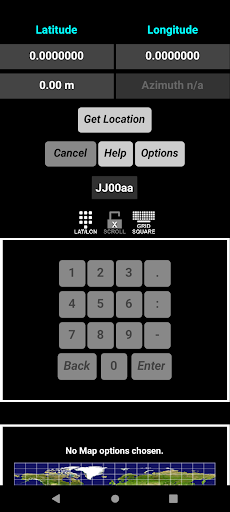
To enter custom coordinates, hold the Latitude and Longitude value fields to enable the Custom Coordinates numerical keypad. You may enter values in DD, D:DM or D:M:S format, depending on the current display.
Using the Offline Map options you may tap on the maps, enter custom Latitude and Longitude, or enter a custom Grid Square via the Grid Square alphanumeric keypad and have that location drawn on static Field and Square maps with a SubGrid pointer. Offline Maps are limited in detail and interaction. Hold the Grid Square value field or tap the GRID SQUARE icon to enable the Custom Grid Square alphanumeric keypad and map options.
Alternatively, with an internet connection, you may use the Online Map options to display a map of your surroundings. Hold a map location to enter those coordinates as a custom Longitude and Latitude and Grid Square. Using the Show Marker option, you may calculate the DX & Bearing from your location to another by tapping on a desired location or by dragging the Marker.
The Online map is not a Grid Square map, but rather it is another way to enter a custom geographical coordinate or location for a custom Grid Square calculation. For a Grid Square map, please use the Offline Map options.
Online map information is provided via the internet by OpenStreetView or the US Geological Survey map servers, and performance is affected by your internet connection, map server availability, and the resource usage on your device. Furthermore, Zoom levels and details may be limited by the area in which you are interested or by the map type. Note that it may be possible to work offline with temporarily cached map data but results will be limited.
Additionally, with an internet connection or cached data, you may enter a custom 2, 4, 6, 8 or 10 character QTH locator value to show the Field (green), Grid Square (black) and SubGrid (dark blue) Extended Square (cyan), and Super Extended Square (red) location on a map. Hold the Grid Square value field or tap the GRID SQUARE icon to enable the Custom Grid Square alphanumeric keypad and map options.
If your device has an Orientation Sensor, then Azimuth readings will be displayed in decimal format and can be used as a compass. Tap on the Azimuth reading to show/hide.
This grid square calculator app will work in either portrait or landscape mode by rotating the device. Hold the Options button to override Sensor orientation and manually set portrait or landscape. Restarting the app returns to Sensor orientation.
You may lock/unlock screen SCROLL by tapping on the lock/unlock icon. Depending on Map options and device orientation, this may be selected automatically and set to enabled/disabled. Online Maps may be easier to use if SCROLL is locked.
This app is intended as an amateur ham radio Grid Square calculator tool and QTH locator for VHF/UHF/microwave radio contesting, QSO parties, and satellite contacts. Preppers and survivalists may also have an interest.
Hold the [ Help ] button or visit
https://kg9e.net/GridSquareGuide.htm
No ads, nags, or in-app purchases. Now with both Offline and Online Map options.
This QTH Locator Grid Square calculator tool converts Latitude and Longitude geographical coordinates into Maidenhead Grid Square with 5 pairs of resolution. This app assumes that by default your device reports Latitude and Longitude in Decimal Degrees and Elevation in Meters.
To convert among Decimal Degrees (DD), Degrees Decimal Minutes (D:DM) and Degrees Minutes Seconds (D:M:S), tap the Latitude or Longitude value field. Tap on the Elevation field to convert between Meters (m) and Feet (f).
You may use the Location Sensor in your Android device (if Location Services are enabled and permission is allowed to GPS/Fine/Precise Location) to obtain your geographical location and calculate your current Grid Square, or you may enter custom coordinates via the numerical keypad to calculate a custom Grid Square.
To enter custom coordinates, hold the Latitude and Longitude value fields to enable the Custom Coordinates numerical keypad. You may enter values in DD, D:DM or D:M:S format, depending on the current display.
Using the Offline Map options you may tap on the maps, enter custom Latitude and Longitude, or enter a custom Grid Square via the Grid Square alphanumeric keypad and have that location drawn on static Field and Square maps with a SubGrid pointer. Offline Maps are limited in detail and interaction. Hold the Grid Square value field or tap the GRID SQUARE icon to enable the Custom Grid Square alphanumeric keypad and map options.
Alternatively, with an internet connection, you may use the Online Map options to display a map of your surroundings. Hold a map location to enter those coordinates as a custom Longitude and Latitude and Grid Square. Using the Show Marker option, you may calculate the DX & Bearing from your location to another by tapping on a desired location or by dragging the Marker.
The Online map is not a Grid Square map, but rather it is another way to enter a custom geographical coordinate or location for a custom Grid Square calculation. For a Grid Square map, please use the Offline Map options.
Online map information is provided via the internet by OpenStreetView or the US Geological Survey map servers, and performance is affected by your internet connection, map server availability, and the resource usage on your device. Furthermore, Zoom levels and details may be limited by the area in which you are interested or by the map type. Note that it may be possible to work offline with temporarily cached map data but results will be limited.
Additionally, with an internet connection or cached data, you may enter a custom 2, 4, 6, 8 or 10 character QTH locator value to show the Field (green), Grid Square (black) and SubGrid (dark blue) Extended Square (cyan), and Super Extended Square (red) location on a map. Hold the Grid Square value field or tap the GRID SQUARE icon to enable the Custom Grid Square alphanumeric keypad and map options.
If your device has an Orientation Sensor, then Azimuth readings will be displayed in decimal format and can be used as a compass. Tap on the Azimuth reading to show/hide.
This grid square calculator app will work in either portrait or landscape mode by rotating the device. Hold the Options button to override Sensor orientation and manually set portrait or landscape. Restarting the app returns to Sensor orientation.
You may lock/unlock screen SCROLL by tapping on the lock/unlock icon. Depending on Map options and device orientation, this may be selected automatically and set to enabled/disabled. Online Maps may be easier to use if SCROLL is locked.
This app is intended as an amateur ham radio Grid Square calculator tool and QTH locator for VHF/UHF/microwave radio contesting, QSO parties, and satellite contacts. Preppers and survivalists may also have an interest.
Developer email
appsKG9E@gmail.com
Developer website
https://www.kg9e.net/apps/AmateurHamRadioGridSquareCalculator/Released
Mar 19, 2018
Current version
1.1.27
Android version
2.1
Reviews & Ratings
4.8
out of 5
5
4
3
2
1
🌟 Loved by users
9 reviewsScreenshots