Gamedeck - The Game Launcher
Vytron Labs

4.4 stars1,399 reviews500,000+Free
PersonalizationEveryoneVersion 1.7.1Updated 1/5/2026, 6:47:37 PM
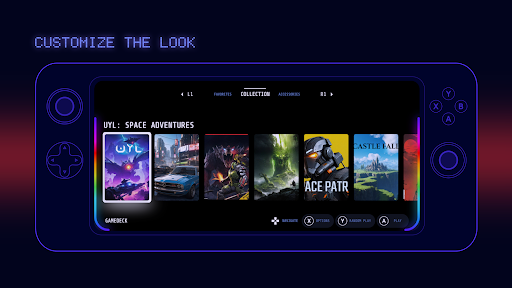
Open in StoreGamedeck is an indie app dedicated to enhancing the experience of mobile gamers. It organizes your game collection in an stylish frontend providing a game console-like experience when browsing your collection. It also offers a range of accessories to help you get the most out of your device while gaming.
Main features:
🔹 Game collection: organize your games, emulators and other apps in a stylish handheld gaming console look. It supports 100+ game consoles, including the most popular ones: Nintendo NES, SNES, N64, Game Boy Color & Advance (GBA), Wii, Switch, PlayStation, PSP, PSX, Xbox, Arcade, etc. Launch games from the most popular emulators: PPSSPP, Dolphin, Eden, DuckStation, RetroArch, GameHub and more.
🔹 Gamepad support: navigation fully compatible with bluetooth and USB gamepads.
🔹 Highly customizable appearance: change game layout, cover, banner, wallpaper, animation, dock, font, colors, style, etc.
🔹 Themes: use predefined themes or create your own.
🔹 Tools: gamepad tester, folders, game art downloader, overlay system analyzer (monitor your device performance: FPS, RAM, Power, Network, etc).
🔹 Use shortcuts: bluetooth, display, system utilities and favorite apps.
It is a good alternative to stock game launchers like Samsung Gaming Hub / Game Hub, Xiaomi Game Turbo and Game Space.
Boost your gaming experience with Gamedeck Game Launcher. Download it now!
Gamedeck is always evolving. Stay tuned for updates.
Keep gaming!
Main features:
🔹 Game collection: organize your games, emulators and other apps in a stylish handheld gaming console look. It supports 100+ game consoles, including the most popular ones: Nintendo NES, SNES, N64, Game Boy Color & Advance (GBA), Wii, Switch, PlayStation, PSP, PSX, Xbox, Arcade, etc. Launch games from the most popular emulators: PPSSPP, Dolphin, Eden, DuckStation, RetroArch, GameHub and more.
🔹 Gamepad support: navigation fully compatible with bluetooth and USB gamepads.
🔹 Highly customizable appearance: change game layout, cover, banner, wallpaper, animation, dock, font, colors, style, etc.
🔹 Themes: use predefined themes or create your own.
🔹 Tools: gamepad tester, folders, game art downloader, overlay system analyzer (monitor your device performance: FPS, RAM, Power, Network, etc).
🔹 Use shortcuts: bluetooth, display, system utilities and favorite apps.
It is a good alternative to stock game launchers like Samsung Gaming Hub / Game Hub, Xiaomi Game Turbo and Game Space.
Boost your gaming experience with Gamedeck Game Launcher. Download it now!
Gamedeck is always evolving. Stay tuned for updates.
Keep gaming!
Developer email
gamedeck.app@gmail.com
Released
Nov 19, 2024
Current version
1.7.1
Android version
7.0
Reviews & Ratings
4.4
out of 5
5
4
3
2
1
🙂 Mostly positive reviews
1,399 reviewsScreenshots